Posts

Showing posts with the label GUI

Backup and Restore your Google Site
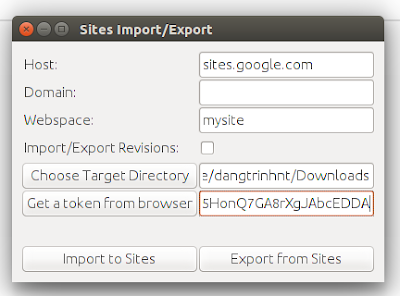
Image
The public Google Sites (old version) does not give you an option to download a backup of your site so it will be a problem if you want to migrate to another place. Fortunately, a project (was originally hosted on Google Code) on Github that can make a copy of your site: "...using HTML Microformats it generates an XHTML version of Sites content suitable for offline browsing and simple HTTP hosting, which is also able to be losslessly imported back into sites." https://github.com/sih4sing5hong5/google-sites-liberation In Ubuntu you can use the tool as follows: 1. Install Java (I tested it with OpenJDK 8) 2. Download the jar package (It's version 1.0.6 when I'm writing this post): https://sih4sing5hong5.github.io/google-sites-liberation/jar/google-sites-liberation-1.0.6-jar-with-dependencies.jar 3. Execute the jar file to open the graphic interface: java -jar google-sites-liberation-1.0.6-jar-with-dependencies.jar With: Host: If not sites.google.c...

Compress PDF file

Image
This is the only solution that works for me in reducing the pdf file size: Usage: 1. In the  command line: $ ./compresspdf.sh mypdf.pdf 2. The command opens a GUI interface, select Screen-view only (72dpi) and click OK  3. Beautiful

Executing shellscript with administrator (sudo) privileges (GUI) in Mac OSX using AppleScript

You created an executable shellscript that requires sudo or admin privileges in Mac OSX to do something like install printers, change DNS server... It's not difficult, you just need to open the terminal, grant the script file the executable permission, then run it. But the thing is the terminal interface may scare the shit out of a normal user. What can you do about that? OK, AppleScript is your savior. Write a wrapper script using AppleScript to call your genius shell. With the AppleScript you can popup a beautiful window (GUI) asking for administrator password. Here is an example: myshellscript.sh: #! /usr/bin/bash sudo networksetup -setdnsservers Wi-Fi 8.8.8.8 Basically, my example do the following: 1. Upload your shellscript somewhere public that allow you to download the script using curl. For example: http://mywebsite.com/myscript.sh 2. Using AppleScript to grant executable privileges to the shellscript with " with administrator privileges ": d...

Ubuntu - How to launch a GUI program in a remote Ubuntu box via SSH

To launch a GUI program in a xUbuntu machine from a remote xUbuntu box, following these steps: 1. Assuming someone had logged-in to the remote machine (let call it R) with user ' remoteuser ' in graphical mode (init 5) 2. From my computer, ssh to R machine with user ' remoteuser ' (!important, if you login to R with another user, this won't work): trinh@local-pc $ ssh remoteuser@R.IP.Address 3. Run the following command before launch any graphical program: remoteuser@remote-pc $ export DISPLAY=:0 4. Finally, launch whatever GUI program you want, for example: Firefox: remoteuser@remote-pc$ firefox &