Posts

Showing posts with the label delete

Delete all Kong targets using bash

Some times I just want to delete all the Kong targets and redeploy all the APIs to troubleshoot some issues. So, I wrote the below bash script: Usage ./clean_all_kong_targets.sh kong.dangtrinh.com:8001

Openstack Pike (deployed by Kolla-Ansible) can not delete instance from dashboard and how to fix

I's trying to delete an compute instance in an OpenStack environment deployed using Kolla-Ansible from the dashboard but helpless. The instance kept saying error... Then I have to do this workaround to delete it: directly from the database (MariaDB) 1. First login to the bash shell of the nova-compute instance: $ docker exec -it <id or name of the nova docker instance> /bin/bash 2. Go to mariadb console using the password generated when I ran kolla-ansible (/etc/kolla/passwords.yml): $ mysql -u root -p 3. Run these command to delete the instance: use nova; update instances set deleted_at = updated_at,  deleted = id,  power_state = 0,  vm_state = "deleted",  terminated_at = updated_at,  root_device_name = NULL,  task_state = NULL  where  deleted = 0; update instance_info_caches set deleted_at = updated_at, deleted = id where deleted = 0;

To use WordPress's wp_delete_user function in your theme or plugin

Just add this line before calling wp_delete_user function: require_once(ABSPATH.'wp-admin/includes/user.php'); wp_delete_user($user->ID);

How to delete directory synced users from the Office 365 dashboard

To be able to delete directory synced users on Office 365 dashboard, you have to disable the sync first on your on-premise server: 1. Open Azure Active Directory Module for Windows PowerShell 2. Connect to the Office 365 server by running this cmdlet in PowerShell and enter your Office 365 admin user (e.g. yyy@xxxx.onmicrosoft.com ): Connect-MsolService 3. Run this following command to disable directory sync: Set-MsolDirSyncEnabled –EnableDirSync $false It may take to 72 hours for the deactivation fully done. 4. Check if the sync was fully disabled by this command: (Get-MSOLCompanyInformation).DirectorySynchronizationEnabled 5. Go Office 365 dashboard and delete the users you want Reference: https://support.microsoft.com/en-gb/kb/2619062

The fastest way to delete large file(s) on Linux

Go to the container directory and run this command: perl -e 'for(<*>){((stat)[9]<(unlink))}'

Remove all celery tasks in Django

To delete all the celery tasks in Django, run the following command: (venv): ./manage.py celery purge

Disabling spam email notification of AntispamBee plugin in WordPress multisite

Antispam Bee is a great spam filtering plugin for WordPress. It's free of charge and ad-free. But the thing is when you apply it for your network, a WordPress multisite with hundred or thousand of blogs, you have to set it up one-by-one. Luckily, I found an easy way to apply the default settings of Antispam Bee for all the blogs, such as disable the spam email notifications or even delete the spam without sending it to the spam folder. It's quite easy, you just need to open the  antispam_bee.php  (/path/to/your/wordpress/wp-content/plugins/antispam-bee/) file and modify these lines as following (around line #370, #371):                                 'flag_spam'             => 0,                                 'email_notify'          => 0,

Delete all pending/spam/trash comments from WordPress (Single or Multisite) using WP-CLI

I just wrote this bash shell script to delete all pending/spam/trash comments from WordPress (Single or Multisite) using WP-CLI: Put the script inside your WordPress root and run: $ ./clean_comments.sh These are available statuses of a comment: approve : approved comments hold : pending comments spam : spams trash : comments in the trash bin This is pretty neat huh?!

Cleaning up your WordPress Multisite instance with wp-cli

At some points in life, your WordPress Multisite will become too big and needs to be cleaned up, things like spam comments, revisions, transients... And of-course, you don't want to go blog by blog to clean up all those things. It may take days or weeks if you have > 1000 sites like mine. Here is your savior: WP-CLI WP-CLI is a command line tool which can help you manage your WordPress site flawlessly (:D). This blog post will show you how to use wp-cli to clean up your WordPress Multisite including: 1. Transients: Create a shell script inside your WordPress dir root: $ cd /path/to/wordpress/root $ sudo nano clean_transients.sh #!/bin/bash for url in $(wp site list --field=url --allow-root) do   echo $url #used for progress purposes   wp transient delete-all --url=$url --allow-root done $ sudo chmod +x clean_transients.sh $ sudo ./clean_transients.sh --allow-root 2. Spam comments: $ cd /path/to/wordpress/root $ sudo nano clean_comments.sh ...

Bulk deleting users in WordPress

Image
To delete a whole bunch of users in WordPress you can do the following trick: 1. Click on Screen Option in the User screen and adjust the " Number of items per page: " do a number you want, such as 600. It will show 600 users. 2. Select all the users on the screen. 3. In Bulk Actions drop-down, select Delete , and click Apply

SQLAlchemy - Get and delete object

These are some utility methods to make a query with SQLAlchemy: I gonna use the MyDatabaseConnector class from the previous blog post : db =  MyDatabaseConnector () * Get object: def get _obj (db, pk): session = db.get_session() try: obj = session.query(MyObjModel).get(pk) except: print "Object not found" finally: session.commit() db.close() * Delete object: def delete_obj (db, pk): session = db.get_session() try: obj = session.query(MyObjModel).get(pk) except: print "Object not found" else: session.delete(obj) finally: session.commit() db.close() Reference:   http://docs.sqlalchemy.org/en/rel_0_9/orm/query.html

Linux - Delete all files with a specific file type

In linux, we can use the following command to delete all files with a specific file type: $ find /my/file/path -type f -iname "*.pyc" -exec rm -f {} \;

M$ Active Directory - Delete multiple AD users through command line

To delete multiple AD users through command line in a Active Directory Domain Controller: 1. Prepare the list of users in a text file (users.txt), one user per line: user.txt: user1 user2 user3 2. Open command prompt as administrator, run the following command: for /f %i in (users.txt) do dsquery user -samid %i | dsrm -noprompt

ORACLE - Get updatable columns of a table

Image
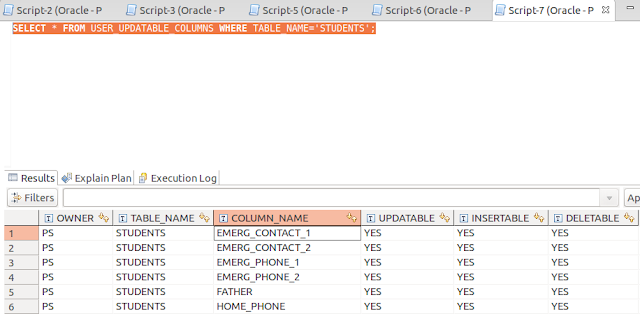
If you want check if a table in your Oracle database can be update, insert or delete, you can use the following query: SELECT * FROM USER_UPDATABLE_COLUMNS WHERE TABLE_NAME='STUDENTS'; And you'll get something like this: