Posts

Showing posts with the label server

#700 - Apache 2.4 HTTPS on Windows Server stops working after running for several hours

I was trying setup an Apache 2.4 server on Windows Server 2008 R2 to server static files for my web applications over SSL. It ran smoothly for couple hours and than hang forever. I tried to restart server every time it happens but it only last for several hours and then crashed again. It frustrated me and after looking to the configuration of Apache for a while, I finally make it works beautifully. 1. Enable MPM in  httpd.conf with those settings: By default, this MPM uses advanced Windows APIs for accepting new client connections. In some configurations, third-party products may interfere with this implementation, with the following messages written to the web server log: Child: Encountered too many AcceptEx faults accepting client connections. winnt_mpm: falling back to 'AcceptFilter none'. The MPM falls back to a safer implementation, but some client requests were not processed correctly. In order to avoid this error, use AcceptFilter with accept filter none. Ac...

Scheduling VMWare virtual machines backup with Veeam Backup Free v9 and PowerShell

The Veeam Backup Free v9 is quite good but it lacks of scheduling the backup task. Fortunately, it supports powershell so you can leverage this following script to backup vms without upgrading to the Pro version: 1. Download and Install Veeam Backup & Replication Free v9 in a Windows machine (It's Windows Server 2008 R2 in my case): https://www.veeam.com/virtual-machine-backup-solution-free.html Note that It may require you to install Microsoft .NET framework 4.5.2 and Microsoft SQL Server 2012 Express if your server does not have them. 2. Install PowerShell v3, it's Windows Management Framework 3.0 (the script works best with PowerShell v3): https://www.microsoft.com/en-us/download/details.aspx?id=34595 for Windows Server 2008 R2, I installed the  Windows6.1-KB2506143-x64.msu package. 3. Download this file and edit it with your own information (server name, email settings...) 4. Create a schedule task to run the script every weekend at 1AM for example. ...

Apply DNS to all the Linux servers (minions) using SaltStack

Okey, let's say you want to change nameserver preferences of about 25 Linux servers. You can do it one by one or take a breath and try SaltStack. 1. In your salt master, create a folder name dns ( /srv/salt/dns ) 2. In /srv/salt/dns/ create: * init.sls : /etc/resolv.conf:   file.managed:     - source: salt://dns/resolv.conf     - user: root     - group: root     - mode: 644     - template: jinja /etc/resolvconf/resolv.conf.d/original:   file.managed:     - source: salt://dns/original     - user: root     - group: root     - mode: 644     - template: jinja * resolv.conf : # Dynamic resolv.conf(5) file for glibc resolver(3) generated by resolvconf(8) #     DO NOT EDIT THIS FILE BY HAND -- YOUR CHANGES WILL BE OVERWRITTEN nameserver my.dns.server1 nameserver my.dns.server2 search my.domain.com * original : search my.domain.com nameserver...

Replace inheritance permissions on folder/file using commandline in Windows server 2008

When you create a new folder or file (B) inside an existing folder (A) in Windows environment (It's Windows Server 2008 R2 in my case), B will inherit all the security access permissions of A. And you don't want that happen just like me. You can run this command in cmd to replace all the inherited aces (access control entries) from B with different ace set (the following will replace all the inherited trustee with domain admins and local administrators): icacls "\path\to\folder\or\file" /inheritance:r /grant:r "MYDOMAIN\Domain Admins":(OI)(CI)F /grant:r "Administrators":(OI)(CI)F /T Please be noticed that if you run this command via a bash shell (cygwin) instead of the Windows's cmd, you have to escape the "\", "(", and ")" characters: icacls "\\path\\to\\folder\\or\\file" /inheritance:r /grant:r "MYDOMAIN\\Domain Admins":\(OI\)\(CI\)F /grant:r "Administrators":\(OI\)\(CI\)F /T ...

Create a SFTP access only user to transfer files from and to a WordPress installation

So I heard that you want to enable FTP access (read + write) to a specific folder inside your WordPress (or any folder) directory to a specific user without installing the FTP service . SFTP is one way to achieve that. Follow these steps: Assuming: myuser: the user you want to grant access. /var/www/myvhost: is a WordPress installation directory. /var/www/myvhost/the_shared_folder (or the wp-content folder) : is a folder inside your WordPress root you want to grant access to myuser. 1. Create the user and specify the shared folder as her home directory: $ sudo useradd -d /var/www/myvhost/the_shared_folder myuser $ sudo passwd myuser 2. Disable shell login on myuser : $ sudo usermod -s /bin/false myuser 3. Configure ssh: $ sudo nano /etc/ssh/sshd_config ... #Subsystem sftp /usr/lib/openssh/sftp-server Subsystem sftp internal-sftp ... Match User myuser         X11Forwarding no         ChrootDirectory /var/www/my...

Clean up boot partition in Ubuntu server

Sometimes you forget to clean up the old kernels and your boot partition full. That may cause you trouble when upgrading new kernel. Here is how you can clean up the boot partition when apt-get keeps telling you to "-f install" (that command keeps failing): 1. Check your current installed kernels: The running one: $ uname -r All kernels instlled: $ sudo dpkg --list 'linux-image*' Note the two newest versions in the list and the one in use (for example 68, 69, 70). 2. Remove the unused kernels (remember to exclude the current and two newest kernel images), for example: $ sudo rm -rf /boot/*-3.2.0-{23,45,49,51,52,53,54,55}-* 3. Run ' sudo apt-get -f install '   to fix the partial install 4. Finally, run ' sudo apt-get autoremove ' to clear out the old kernel image packages. Note: to see available space on the boot partition: $ sudo df -h Reference:   http://askubuntu.com/questions/345588/what-is-the-safest-way-to-clean-up-boot-p...

Hide NginX and PHP headers to harden your server

Hiding server's information may help protecting your server from malicious server scanning from hackers. Here are some way to hide nginx and php information: 1. NginX Install nginx-extras to have more options: $ sudo apt-get install nginx-extras Open the /etc/nginx/nginx.conf and add those following lines (blue ones) inside the http block: http { ...         server_tokens off; # hide the nginx version         more_set_headers 'Server: My MotherFucking Server'; # Change the Server header ... } Then start (or restart) the nginx server: $ sudo service start nginx 2. PHP You can hide the php version by modify the file /etc/php5/fpm/php.ini ... expose_php = Off ... Restart the php5-fpm process: $ sudo service php5-fpm restart Cool!

Running cherrymusic as a service in Ubuntu 14.04 with Supervisord

In the previous blog post, I showed you how to run a music streaming service on your computer: http://iambusychangingtheworld.blogspot.com/2014/10/build-your-own-music-streaming-website.html Today, I will guide you how to setup cherrymusic as a service using Supervisord . I love Supervisord! I got some trouble getting cherrymusic to work with Supervisord: * I first tried running cherrymusic with Python2: when clicking to the "browse files" link, it said that cannot browse files and throw this error in the backend: UnicodeDecodeError: 'ascii' codec can't decode byte 0xec in position 1: ordinal not in range(128) * Then, I switched to Python3 and also got errors, but this time, it is a fixable issue:   cherrymusic can list my albums but when I clicked to one of the album, it through this error: ... UnicodeEncodeError: 'utf-8' codec can't encode character '\udcc3' in position 7: surrogates not allowed this is a Python3's bug: h...

Build your own music streaming website with cherrymusic

Image
So I heard that you want to build a music streaming website and share your music with friends? Oh right, oh right, oh right, here you go: Cherry Music: Official website:   http://www.fomori.org/cherrymusic/ Github repository:   https://github.com/devsnd/cherrymusic 1. Install dependencies and all extra codec libs: $ sudo pip install cherrypy $ sudo apt-get install vorbis-tools flac lame  imagemagick Note: If you get into trouble when installing imagemagick, please read this forum thread for the resolution:  http://askubuntu.com/questions/471045/14-04-doesnt-have-package-imagemagick 2. Clone the cherrymusic repository: $ git clone https://github.com/devsnd/cherrymusic.git 3. Start the server: $ cd cherrymusic $ python cherrymusic --setup --port 8080 4. Open your browser, go to   localhost:8080, and s et the initial configurations including: * Media base directory * Server port ... Then click Save... and Create admin use...

Nginx "Connection refused" error when setting upstream as localhost

For some reason, I checked out the nginx error log last night and got this error: 2014/10/28 06:53:54 [error] 5437#0: *28 connect() failed (111: Connection refused) while connecting to upstream, client: 192.168.1.3, server: my.domain.com, request: "GET /staff/acts/report-by-acts/ HTTP/1.1", upstream: " http://[::1]:8080 /staff/acts/report-by-acts/", host: "my.domain.com", referrer: "http://my.domain.com/staff/families/all/" But my web application is still working properly. What happened? Where was the problem? I looked into the nginx configuration and found that I set upstream server of that app as localhost: upstream asa {     server localhost :8080 fail_timeout=0; } So, I changed the server directive to 127.0.0.1, restart nginx, and the error gone away: upstream asa {     server 127.0.0.1 :8080 fail_timeout=0; }

Install Redis and run as a service

To install and run Redis as a service in Ubuntu, following these steps: 1. Download and build Redis: $ wget http://download.redis.io/redis-stable.tar.gz $ tar xvzf redis-stable.tar.gz $ cd redis-stable $ make $ make test After the compilation the src directory inside the Redis distribution is populated with the different executables that are part of Redis: redis-server is the Redis Server itself. redis-cli is the command line interface utility to talk with Redis. redis-benchmark is used to check Redis performances. redis-check-aof and redis-check-dump are useful in the rare event of corrupted data files. It is a good idea to copy both the Redis server than the command line interface in proper places using the following commands: $ sudo cp redis-server /usr/local/bin/ $ sudo cp redis-cli /usr/local/bin/ 2. Install Redis: Create a directory where to store your Redis config files and your data: $ sudo mkdir /etc/redis $ sudo mkdir /var/redis Copy...

Using git to deploy/update source code to production server

I've just tried the we-all-know-what-it-is tool, git , to deploy and update changes to production server: 1. On my development computer, commit all changes and push to the repository: $ git add -A . $ git commit -m "Before deploying" $ git push origin master 2. On the production server: $ git clone myaccount@my.repo.address 3. In the development machine, update code, commit, and push to repository: $ git add -A . $ git commit -m "Updates" $ git push origin master 4. In production server, pull code from master: $ git pull origin master ...and so on It's quite interesting!

Flask + Gunicorn + Supervisor + Nginx

This morning, I deployed a Flask application in a Ubuntu 13.04 server with Nginx and Gunicorn. Here is the configuration: 0. My app code base (blog): /projects/blog/ 1. I created a shell script to run gunicorn: /projects/blog/blogguni.sh ======================== #!/bin/bash NUM_WORKERS=4 # user/group to run as ADDRESS=127.0.0.1:5000 cd /projects/blog /projects/.venv/blog/bin/gunicorn blog:app -w $NUM_WORKERS -b $ADDRESS 2. Supervisor configuration: /etc/supervisor/conf.d/blogguni.conf ========================== [program:blogguni] directory = /projects/blog/flaskr/ user = dangtrinhnt command = /projects/blog/blogguni.sh stdout_logfile = /projects/logs/supervisor_blog.log stderr_logfile = /projects/logs/supervisor_blog_error.log 3. Nginx configuration: /etc/nginx/sites-available/blog ==================== upstream blog {     server localhost:5000 fail_timeout=0; } server {     listen 80;     server_name dangtrinhnt.kd...

Active Directory - Great free tool to reset password in bulk

I have to reset multiple accounts passwords. I's looking for a way to use the powershell to read csv file and then update the password just like I did before ( http://iambusychangingtheworld.blogspot.com/2013/08/activedirectory-update-user-info-from.html ). Unfortunately, the Active Directory Module for Windows PowerShell is only available in Windows Server 2008 R2 and Windows 7 which I don't have now (only Server 2008 SP2). So, I's googling around and then I found this: Bulk Password Control http://www.wisesoft.co.uk/software/passwordcontrol/bulk_password_control.aspx This free tool can help me update all the users passwords which are auto generated. It even let me export the information to csv file. It's so cool! Genius!!! Note: install this tool inside the Active Directory Domain Controller.

Windows DHCP Server - Clean ReservedIP Addresses

Image
To clean all the reserved IP addresses on a Windows DHCP server (my-srvr): 1. Dump configuration of that server to origin.cfg by running the following command on windows: netsh dhcp server \\my-srvr scope 172.40.0.0 dump > C:\origin.cfg 2. Read the config file, get the reserved ip part, remove "Add" with "delete", and then write them to a new config file names new.cfg. Using python to do all of those: def create_del_ri_cfg(org_path, out_path):     org_file = open(org_path, 'rb')     cfg = org_file.read()     org_file.close()     ri_pos = cfg.index('#  Start Add ReservedIp')     cfg = cfg[ri_pos:]     cfg = cfg.replace('Add', 'delete')     out_file = open(out_path, 'wb')     out_file.write(cfg)     out_file.close() 3. Execute the new config file to delete all reserved ip addresses of my-srvr: netsh exec C:\new.cfg (source: h...

Django - Using Upstart to run Django built-in dev server

Sometimes, You only want to have a small django server to run a not-important-app, and you dont want to install any extra stuff. So, my solution is just use the Django built-in development app and make it start as a service at startup with Upstart (in Ubuntu). Here is how:

M$ DHCP Server - Reserved IPs synchronization between servers

Image
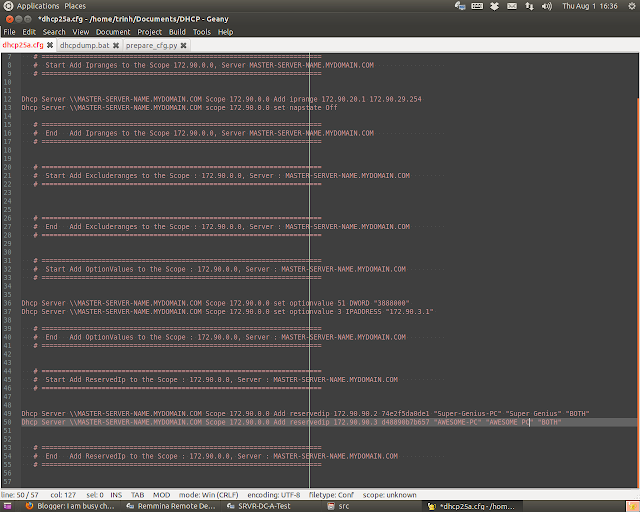
Although the M$ DHCP Server does not allow you to synchronize the reserved IP(s) with other DHCP servers, but If you want, you can do it with a small trick: 1. Export the dhcp config of the master server by the command (in the command prompt windows): netsh dhcp server \\master-server-name scope 172.90.0.0 > C:\master.cfg The config file are something like this:

Shell - Copying file from remote server to local machine

Sometime you want to copy something (files) from your remote server to your local machine. The thing is, the remote server is the only one that has ssh, so you can only push file to it (remote one) through scp command. I found the rsync command that solves the problem: (type this in your local machine's terminal) rsync -chavzP --stats user@remote.host:/path/to/copy /path/to/local/storage