Posts

Showing posts with the label virtualbox

Trying the Taiga project management platform

Image
If you love Agile and looking for a tool to integrate that method into your org, you should try Taiga: https://taiga.io/ Taiga is an open-sourced project management platform based on Django and AngularJS which are both also open-sourced. It's really easy to get started with Taiga using vagrant thanks to the team: https://github.com/taigaio/taiga-vagrant All you have to do are (you need to have VirtualBox and Vagrant installed on your machine first): $ git clone https://github.com/taigaio/taiga-vagrant.git $ cd taiga-vagrant $ vagrant up After the provisioning is finished, you can access the platform by opening your browser, enter this address: http://localhost:8000 The default admin user is admin / 123123 If the vagrant provisioning does not process successfully, you can have a look at the script: https://github.com/taigaio/taiga-vagrant/blob/master/scripts/provision.sh The provision script will clone this taigao-scripts repo and run the setup-server.sh: ...


Getting started with Cassandra

Image
Apache Cassandra™ is a massively scalable open source NoSQL database. Cassandra is perfect for managing large amounts of structured, semi-structured, and unstructured data across multiple data centers and the cloud. Cassandra delivers continuous availability, linear scalability, and operational simplicity across many commodity servers with no single point of failure, along with a powerful dynamic data model designed for maximum flexibility and fast response times. For more information about Cassandra's architecture, please read this documentation:   http://www.datastax.com/documentation/cassandra/2.0/cassandra/gettingStartedCassandraIntro.html If you want to give it a try without having to allocate a big amount of resource, you can use the pre-built Cassandra virtual machine which can be downloaded at  https://s3.amazonaws.com/planetcassandra-downloads/Cassandra-2.0.6.ova 0. First, there are some terms in Cassandra data model you need to know in comparison with Relation...

How to fix some Vagrant issues

Here are some issues you will face when playing around with Vagrant and how to fix them: 1. Cannot install plugin Remove ~/.vagrant.d directory before re-installing vagrant. 2. Your VM has become "inaccessible." Unfortunately, this is a critical error with VirtualBox that Vagrant can not cleanly recover from. Please open VirtualBox and clear out your inaccessible virtual machines or find a way to fix them. Remove .vagrant file. 3. Cannot run a vm with Vitualbox: Enable VT-x feature in your machine's BIOS. ...

edX-platform - Installing fullstack edX using a pre-built Vagrant image

Image
The edX team has been release the new Configuration, a project that help us to deploy and test edX easily, with code name  brioche . I'll try this and see how easy and improved it is. I will follow this wiki:  https://github.com/edx/configuration/wiki?utm_content=buffer0f89a&utm_source=buffer&utm_medium=twitter&utm_campaign=Buffer My computer: + Xubuntu 12.04LTS x86 64bit + CPU Intel core i3 + 4GB of RAM 1. Install requirements: + VirtualBox: 4.2.18 r88780 + Vagrant 1.3.3 2. Download vagrant image (the image's size is about 2.7GB, so I decided to download it manually): https : //s3.amazonaws.com/edx-static/vagrant-images/20130930-brioche-fullstack.box 3. Run vagrant init: # for the full edX stack (md5sum 6b26448fa92056d42f50d910c854a767) vagrant init edx 20130930-brioche-fullstack.box 4. Edit the created Vagrantfile, uncomment and modify these following lines: config.vm.box_url = "20130930-brioche-fullstack.box" ...

Linux - Test website in Internet Explorer on a Linux machine

Image
One of the most common issues in web development world is Internet Explorer compatibility. It's a pain in the ass. And It's even more annoying when Ubuntu is the only machine I have. So, I have to install a virtual machine (VirtualBox) to scratch the itch. Luckily, Microsoft has acknowledged that problem and provide us some pre-built VM images at http://www.modern.ie/en-us/virtualization-tools#downloads . In my case, I download the IE10 - Win7 image. Follow the instructions in the link to install the VM: Instructions Download the SFX and all RAR files for the VM (smaller VMs may not have files with RAR extension). In each set below that contains a split archive, the provided text file (.txt) contains URLs to all files in the set, and this can be used directly with the 'wget' command in Linux. From the terminal, enter wget -i [URL TO TEXT FILE] . For Windows XP single file do...

edX-platform - Up and Running in Vagrant environment

Image
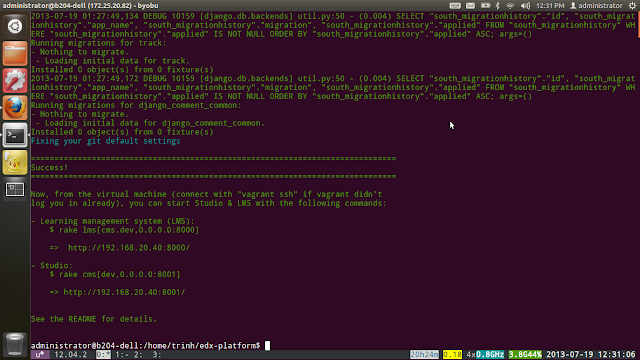
After a while messing around with edX platform source code (http://iambusychangingtheworld.blogspot.com/2013/06/edx-source-code-exploration.html), I decided to run the platform using the recommended way, the Vagrant way. I followed the instructions from the edx-platform repo: https://github.com/edx/edx-platform#installation---the-first-time. But, there're something I had to do to make it work: 0. My computer (CPU) has to support virtualization technology or the vagrant environment will not run or hang forever :D. So, CPU core i3, i5 +... is fine .