Posts

Showing posts with the label insert

How to embed pdf files into your blog (Blogger, WordPress...)

Image
To embed a pdf file into your Blogger or WordPress blog just follow these following steps: 1. Upload the pdf file to Google Drive 2. Set the sharing option of that file to Public (Everyone with the link can View) 3. Click "Get Link" to get the ID of the pdf file. For example: https://drive.google.com/open?id= 0B5ND3Z6x0cw8MkJTV21DNjZUeVk &authuser=0 4. In your blog, insert this iframe with the ID of your pdf file, for example: <iframe height="600px" src="https://docs.google.com/viewer?srcid= 0B5ND3Z6x0cw8MkJTV21DNjZUeVk &amp;pid=explorer&amp;efh=false&amp;a=v&amp;chrome=false&amp;embedded=true" width="100%"></iframe>

Google Drive API - Copy folder

There is no usual way to copy a folder in Google Drive using the API. But, We can still create folders and have the copy file api . So, following these steps we can copy folders: 1. Insert a new folder 2. Make a copy of all files inside the source folder 3. Assign the new folder as the parent of the copied files 4. For sub folders, use recursion to copy. I've implemented that flow: from apiclient import errors def copy_file (service, origin_file_id, copy_title, parentid=None):     """Copy an existing file.     Args:         service: Drive API service instance.         origin_file_id: ID of the origin file to copy.         copy_title: Title of the copy.     Returns:         The copied file if successful, None otherwise.     """     copied_file = {'title': copy_title}   ...

ORACLE - Get updatable columns of a table

Image
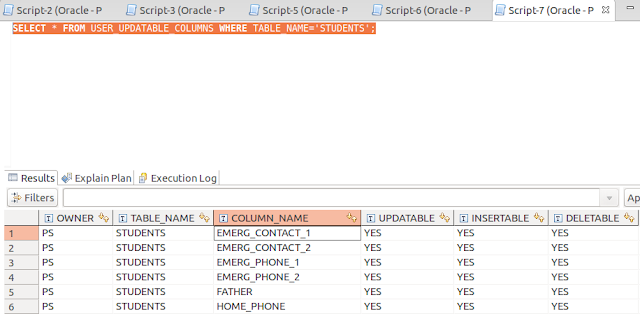
If you want check if a table in your Oracle database can be update, insert or delete, you can use the following query: SELECT * FROM USER_UPDATABLE_COLUMNS WHERE TABLE_NAME='STUDENTS'; And you'll get something like this: