Posts

Showing posts with the label backup

Backup and Restore your Google Site
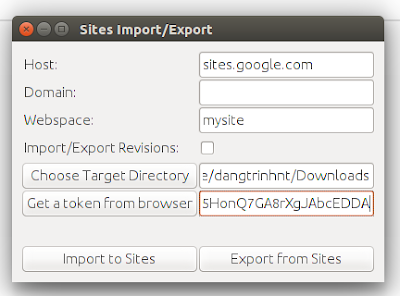
Image
The public Google Sites (old version) does not give you an option to download a backup of your site so it will be a problem if you want to migrate to another place. Fortunately, a project (was originally hosted on Google Code) on Github that can make a copy of your site: "...using HTML Microformats it generates an XHTML version of Sites content suitable for offline browsing and simple HTTP hosting, which is also able to be losslessly imported back into sites." https://github.com/sih4sing5hong5/google-sites-liberation In Ubuntu you can use the tool as follows: 1. Install Java (I tested it with OpenJDK 8) 2. Download the jar package (It's version 1.0.6 when I'm writing this post): https://sih4sing5hong5.github.io/google-sites-liberation/jar/google-sites-liberation-1.0.6-jar-with-dependencies.jar 3. Execute the jar file to open the graphic interface: java -jar google-sites-liberation-1.0.6-jar-with-dependencies.jar With: Host: If not sites.google.c...

Restore Moodle course in command line with MOOSH

It's the next step of this , restoring your big Moodle course in command line with MOOSH: course-restore Restore course from path/to/backup.mbz to category or existig course. Example 1: Restore backup.mbz into category with id=1 moosh -n course-restore backup.mbz 1 Example 2: Restore backup.mbz into existing course with id=3 moosh -n course-restore -e backup.mbz 3

Backup Moodle courses in command line using MOOSH

Sometimes, you cannot backup your Moodle course because it is too big which makes the web server timeout. In that situation, backing up the course using command line is a good way to go. MOOSH will help you perfectly. Github repository: https://github.com/tmuras/moosh Official website and documentations:   http://moosh-online.com/ 1. Install MOOSH in your Ubuntu server:  sudo apt-add-repository ppa:zabuch/ppa  sudo apt-get update  sudo apt-get install moosh 2. Go to moodle installation folder and run this command: $ moosh -n course-backup -f /path/to/where/you/store/backup/mycourse.mbz <course_id>

Scheduling VMWare virtual machines backup with Veeam Backup Free v9 and PowerShell

The Veeam Backup Free v9 is quite good but it lacks of scheduling the backup task. Fortunately, it supports powershell so you can leverage this following script to backup vms without upgrading to the Pro version: 1. Download and Install Veeam Backup & Replication Free v9 in a Windows machine (It's Windows Server 2008 R2 in my case): https://www.veeam.com/virtual-machine-backup-solution-free.html Note that It may require you to install Microsoft .NET framework 4.5.2 and Microsoft SQL Server 2012 Express if your server does not have them. 2. Install PowerShell v3, it's Windows Management Framework 3.0 (the script works best with PowerShell v3): https://www.microsoft.com/en-us/download/details.aspx?id=34595 for Windows Server 2008 R2, I installed the  Windows6.1-KB2506143-x64.msu package. 3. Download this file and edit it with your own information (server name, email settings...) 4. Create a schedule task to run the script every weekend at 1AM for example. ...

How to set name of the wxr file when exporting blog data using wp-cli

By default (actually, you cannot change right now), when you export blog data usingWP-CLI, the wxr will be name as following: myblogname.wordpress.2015.xml 1. Clone the wp-cli project: $ git clone https://github.com/wp-cli/wp-cli.git 2. Install composer and install WP-CLI's dependencies: $ curl -sS https://getcomposer.org/installer | php $ sudo mv composer.phar /usr/local/bin/composer $ cd /path/to/wp-cli/src/ $ composer install 3. Modify the get_filename_template function in /path-to-wp-cli-src/php/commands/export.php. For example, I want to name the exporting file after the blog's path: blog-1-path.xml $ nano /path/to/wp-cli/src/php/commands/export.php ... private static function get_filename_template() { $export_file_name = get_bloginfo('url') . ".xml"; $export_file_name = str_replace("http://", "", $export_file_name); $export_file_name = str_replace("/", "", $export_file_name); if( i...

XtraBackup error "InnoDB: Operating system error number 24 in a file operation."

This morning, I tried to backup the MariaDB database using xtrabackup: $ xtrabackup --backup --datadir=/var/lib/mysql/ --target-dir=/data/backups/mysql/ and ran into this error: ... InnoDB: Operating system error number 24 in a file operation. InnoDB: Error number 24 means 'Too many open files'. InnoDB: Some operating system error numbers are described at InnoDB: http://dev.mysql.com/doc/refman/5.1/en/operating-system-error-codes.html InnoDB: Error: could not open single-table tablespace file InnoDB: ./roei_cc/transport.ibd! InnoDB: We do not continue the crash recovery, because the table may become InnoDB: corrupt if we cannot apply the log records in the InnoDB log to it. InnoDB: To fix the problem and start mysqld: InnoDB: 1) If there is a permission problem in the file and mysqld cannot InnoDB: open the file, you should modify the permissions. InnoDB: 2) If the table is not needed, or you can restore it from a backup, InnoDB: then you can remove the .ibd...

Moodle - PHP cli script to mass import template course data to all other courses

With the great UI of the Moodle (I'm using version 2.7) you can import data (blocks, activities, filters, questionbank,...) from a template course into a course. But if you want to apply all the template course data to many courses, you have to do manually for every single course. The question is, what if I can automate that process? To solve this problem, I decided to write a php command line script to do the cloning without the web interface. So, the first place I had to look at is the /<dir root>/backup/import.php file. Then, I made some hacks and created my own script at /<dir root>/mycustomscriptfolder/massimport.php : Usage: + To clone the template course data to a single course: $ php massimport.php <template course id> <course id> Example: to apply template course with id = 3 data to course id = 145: $ php massimport.php 3 145 + To clone the template course data to all other courses in your moodle: $ php massimport.php <template ...