Posts

Showing posts with the label email

edx-platform - How to make SMTP work on your Open EdX instance the proper way

There were several threads in the Open EdX mailing list asking about how to make the email working. But, it seams like there is no proper instructions out there to help people. So, I decided to write something about that. Firstly, there are 3 simple things to keep in mind: All the authentication information should be kept privately. If you add them to the edx-platform source files there will be conflicts when you upgrade or pull from master/branches. So, the best place to keep all the settings for all your Open edX applications is /edx/app/edx_ansible/server-vars.yml .  0. Checkout all of your modification on: (to avoid source code conflicts) cms/envs/common.py lms/envs/aws.py cms.env.json cms.auth.json lms.env.json lms.auth.json 1. Create  server-vars.yml   in  / edx/app/edx_ansible/ 2. Add these following variables to server-vars.yml with your SMTP information: EDXAPP_EMAIL_BACKEND: 'django.core.mail.backends. smtp.EmailBackend' EDXAPP_EMAIL_HOST: '...

Generate snapshots report of all VMWare virtual machines using PowerCLI

Ok, so I heard that you're tired of going to every virtual machines in your VMWare vCenter and checking for snapshots that need to be removed. VMWare has provided a solution that can ease your pain, It's PowerCLI . In short,  PowerCLI is a Windows PowerShell interface for managing VMware vSphere. It comes with a lot of useful cmdlets that will help you manipulate your VMWare infrastructure smoothly and painlessly (sort of) including automating tasks. Here is how I can generate a snapshots report of all the virtual machines in my VMWare 6 environment: 1. In a Windows Server 2008 R2 SP1 (or Windows 7 and above), install these dependencies: vSphere client v6 for windows: download here . Microsoft Management Framework 3.0 : download here (for Windows Server 2008 R2 SP1, I will download Windows6.1-KB2506143-x64.msu package) 2. Download and install PowerCLI: Download the latest PowerCLI here . It's PowerCLI 6 R3 at the time I write this article. 3. Open Powe...

Disabling spam email notification of AntispamBee plugin in WordPress multisite

Antispam Bee is a great spam filtering plugin for WordPress. It's free of charge and ad-free. But the thing is when you apply it for your network, a WordPress multisite with hundred or thousand of blogs, you have to set it up one-by-one. Luckily, I found an easy way to apply the default settings of Antispam Bee for all the blogs, such as disable the spam email notifications or even delete the spam without sending it to the spam folder. It's quite easy, you just need to open the  antispam_bee.php  (/path/to/your/wordpress/wp-content/plugins/antispam-bee/) file and modify these lines as following (around line #370, #371):                                 'flag_spam'             => 0,                                 'email_notify'          => 0,

Automatically add new created users (by email or ldap login) to a project in Redmine

Alright, just got this to work a couple minutes ago: * I'm using the Redmine's rake to create issues by fetching email messages ( read this ): RAILS_ENV="production" /usr/bin/rake redmine:email:receive_imap host=imap.gmail.com port=993 ssl=1 username=myemailusername@mydomain.com password=myPassword project=helpdesk unknown_user=create no_permission_check=1 no_account_notice=1 Project id: helpdesk Default user role: Customer * If the email address of the sender is not in Redmine's db, it will create a new user with that email. Let call it joeuser . The problem is the new created user was not added to the project ('helpdesk'), so she will not receive any follow-up email messages (any updates of the ticket). So, I have to modify the Redmine's core to add the new user to the helpdesk project with the Customer role: 1. New user created by the Email task: /path/to/redmine/app/models/mail_handler.rb if addr && !addr.spec.blank?...

SMS reminder in Redmine with Google Apps Script

Image
Do you remember how we use Google Apps Script to get SMS notification every time we receive an email? If not, please read this article . It's even cooler if you can take advantage of that script to remind you about Redmine 's issues due date. Even though Redmine already has the email reminder feature which is quite convenient but if you want more, like SMS, here is the hack: 1. Turn on the email reminder feature of Redmine by adding a crontab to run this rake task: # crontab -e 00 08 * * * /usr/bin/rake redmine:send_reminders days=7 users="12" RAILS_ENV="production" Everyday at 8AM, it will check Redmine, if there is any issue of mine will due in 7 days (not in closed status), it will email me. To turn the reminder on for all user, just get rid of the " users " parameter. More details at here . 2. In Gmail, create a filter for all email messages has the following word: Has the following words: " issue(s) due in the next ...

Google Apps Script - Part 2 - Send email result to selected address after submitting google form (advanced, email with template)

Image
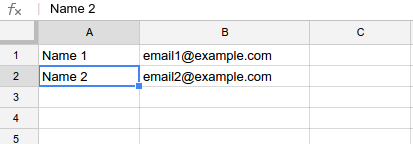
This blog post is an advanced topic of the previous article about sending email result to the selected address after submitting a google form. The advanced features are: The email address will be get from a separate sheet instead of choosing from the form. The email content will be get from a template which is also from a sheet instead of hard-coding into the script. 1. In the same spreadsheet of the responses sheet, create a new sheet name "emailaddresses". Fill in the name of a person in one column (A) and email address of that person in another column (B): Note: The names in column A need to be exactly the same with the names lists in the form. Check out the  getEmailByName  function in the script below for more detail. 2. In the same spreadsheet of the responses sheet, create a new sheet name "emailtemplate": * Create your email template in html form with placeholder where you will fill in the submitting result, for example: * Minify the template ...

Google Apps Script - Part 1 - Send email result to selected address after submitting google form (basic)

Image
So, you want to email someone (something like a feedback to that person) whenever you submitting the google form. Here you go, using this google apps script: 1. First, make sure you have already setup the responses spreadsheet and name it , for example: "sheet1" . Look for the spreadsheet ID in the URL. It's something like: '11BvY139qDAc06KxJrSUowCRwPNKVgNgSsPtmjQGhOPQ' 2. Insert a blank column at the end of the responses spreadsheet , e.g column AH ( 34 ). Enter this formula in the first row: = indirect ( "AG" & counta ( A1:A ) ) "AG" is the column contains email addresses. 3. From the google form edit windows, choose Tools >> Script editor... to open script editor window and input this function : 4. In the Script Editor windows, select Resources >> Current Project's Triggers >> Add a new trigger 5. Go to the live form, and try to submit. Cool!!! \m/

edx-platform - Activation link when registering account from CMS after 05/16/2014 update

This morning, after I ran an update for our Open edX instance, the activation link when registering from CMS was 'localhost' even though the EDXAPP_SITE_NAME variable was set to 'our.domain.com'. After a while looking around the ansible playbooks of the configuration repo, I figured out why. There were some changes with the main configuration file which caused the issue: https://github.com/edx/configuration/blob/master/playbooks/roles/edxapp/defaults/main.yml They are: EDXAPP_SITE_NAME : 'localhost' EDXAPP_LMS_SITE_NAME : "{{ EDXAPP_SITE_NAME }}" EDXAPP_CMS_SITE_NAME : 'localhost' So, I had to add EDXAPP_CMS_SITE_NAME variable in /edx/app/edx_ansible/server-vars.yml and ran the update script again: EDXAPP_SITE_NAME : 'our.domain.com' EDXAPP_CMS_SITE_NAME : 'our.domain.com' For now, the  EDXAPP_CMS_SITE_NAME  have to be the same with  EDXAPP_SITE_NAME  or the activation link will not work.

Accept both username and email address as login identity in simplesamlphp

By default, simplesamlphp only allow you to login by username. But, you hack the source code to make simplesamlphp accept both username and email address as login identity. The solution is pretty simple: + just take the input username and check if -- it is an email than split the string, get only the username part -- it is not an email, than use the input string # nano /path/to/simplesamlphp/modules/core/www/loginuserpass.php ... function get_username($un) {         if (strpos($un,'@') !== false) {                 $un = strstr($un, '@', true);         }         return $un; } if (array_key_exists('username', $_REQUEST)) {         $username = get_username($_REQUEST['username']); } elseif ($source->getRememberUsernameEnabled() && array_key_exists($source->getAuthId() . '-username', $_COOKIE)) {         $usernam...

Google SMTP Error: 454 4.7.0

This morning, I tried to send around 1/2 thousand of emails using an Google App Email account from my Django app along with celery and django-mailer . But after 100 messages were sent, the celery task cannot send email, and I got this error: Google SMTP Error: 454 4.7.0 Too many login attempts, please try again later There are something I need to do to solve this: 1. Add a DKIM record in Google Apps: following this stackoverflow question: http://serverfault.com/questions/543007/google-smtp-error-454-4-7-0-too-many-login-attempts-please-try-again-later In order to add a DKIM record in Google Apps, you need to do the following: Go to the Admin Console Click on "Google Apps" Click on "Gmail" Scroll down until you see "Authenticate Email" and click that Select the domain you wish to add DKIM to When it asks what prefix you want to use, simply use the default of 'google' You will then see a TXT record in two parts, one piece has...

Redmine - How the Email fetching from IMAP server task works

As I mentioned in the previous blog post, you can make the redmine a support ticketing system by running the rake task to fetch email from IMAP server: http://iambusychangingtheworld.blogspot.com/2014/02/redmine-email-notifications-are-not.html I have no ruby experience, but as far as I understand this is how the imap rake task works. First of all, let take a look at the command: rake -f /path/to/redmine/appdir/Rakefile --silent redmine:email:receive_imap RAILS_ENV=production host=imap.foo.bar username=redmine@somenet.foo password=xx project=myproject unknown_user=create no_permission_check=1 no_account_notice=1  1. The rake task : /path/to/redmine/lib/tasks/email.rake     task :receive_imap => :environment do       imap_options = {:host => ENV['host'],                       :port => ENV['port'],                       :ssl =...

Django - From Email's Name

Image
The from_email address parameter of django.core.mail.send_mail and mailer.send_mail ( https://github.com/pinax/django-mailer ) can be in these forms: 1. 'trinh@example.com' 2. 'Trinh Nguyen <trinh@example.com>' send_mail ( subject , message , from_email , recipient_list , fail_silently=False , auth_user=None , auth_password=None , connection=None , html_message=None )

edX-platform - Another way to activate user account in dev environment

Image
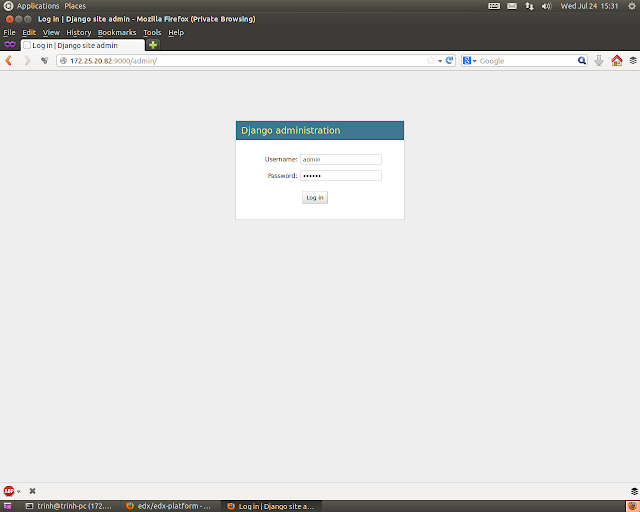
In development environment, when creating an user account, you need to verify that account. The verification email will be logged to the console, so you can take a look at the terminal and get the activation url ( click here to see the edx's instruction ). But if you can't see that link, you can do the following: 1. Create a superuser account: rake django-admin["createsupseruser"] 2. Login to the django admin app of LMS (through the url "http://192.168.20.40:8000/admin" or in my case I used the url "172.25.20.82:9000/admin" to access the machine that running the edx-platform) by the superuser account, and check Active status for the user you want to activate:

Python - Send email with attachments

This is the code snippet to send an email with attachments using python smtp module:

Sending email with template using model form (also update template in the same view) in Django

Here is the technique that I use when sending email with template using Django model form. It also gives me the ability to update the model in the same view with the email form. models.py :

Asynchronously sending email using Django, Celery, Django-mailer

It's good to blog in a beautiful Sunday. This is the second one. A popular situation a webapp can face is to send thoundsands of emails to the users. This action can block the system a while, and this is annoying! To solve this problem, there are many solutions. One of them is sending email to a queue and send them later in the background (automatically), so the system don't have to be freezed. Pretty cool huh? I will setup a message queue in Django with: