Posts

Showing posts with the label windows

Running Selenium with chromedriver inside a Windows container
Image
Running Selenium for Web UI testing in a Windows container is a little bit tricky. I spent a week on this and finally could make it to work thanks to the idea in [1]. Woohuu! Let's take a look at this sample Java application that runs Selenium with chromedriver. 1. Make sure your Desktop Docker running with Windows Container mode 2. In your Dockerfile, make sure: Install the needed fonts (googlechrome) => this is the most important thing!   ADD files/fonts.tar /Fonts/ WORKDIR /Fonts/ RUN @powershell -NoProfile -ExecutionPolicy Bypass -Command ".\Add-Font.ps1 Fonts" Enable Web-WebSockets feature using Powershell RUN @powershell -NoProfile -ExecutionPolicy Bypass -Command "Add-WindowsFeature Web-WebSockets" Install chocolatey to install openjdk8, and googlechrome RUN @powershell -NoProfile -ExecutionPolicy Bypass -Command "iex ((New-Object System.Net.WebClient).DownloadString('https://chocolatey.org/install.ps1'))" && SET "PATH=%...
Build and run Windows container

Image
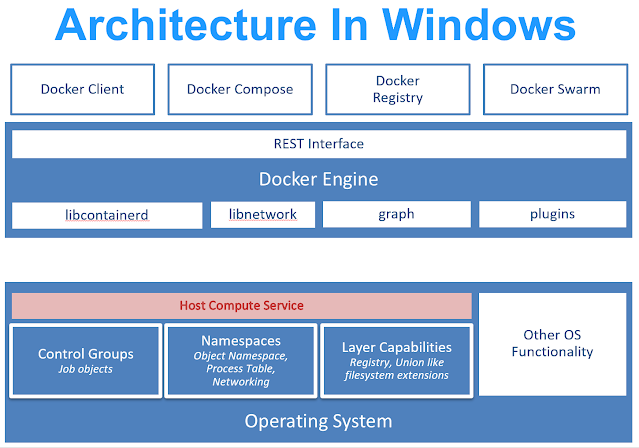
Running Windows container... wait what? Windows??? WTF? Okay, take it easy genius! It gonna be alright! Microsoft has been working closely with Docker to add containerized applications for its OS platform. And, it's working nicely even though at first you will feel the pain in the ass. There are a couple of things you need to take into account working with Windows container First of all, you have to use a Windows machine to build and run Windows containers. Containers are using the underlying Operating System resources and drivers, so Windows containers can run on Windows only (Linux containers can run on Windows with WSL enabled). If you're using Docker Desktop on Windows 10, you have to use it with Windows Container enabled. There will be no GUI Windows environment (servercore or nanoserver) [1]. Of course, it's containers! There will be no "latest" tag for your Windows base docker image. Powershell is the King [2]. Just like any Linux container, you have to use...

Make function keys work on putty's ssh session

Image
When you ssh to a Linux machine using putty and running tmux or byobu, by default, you can not use function keys to switch between sessions (F3, F4) or create a new session (F2). By setting putty as below, you will "fix" that: 1. Go to Putty settings, Terminal section, Keyboard, The Function keys and keypad, select Xterm R6 2. Apply and close.

How to fix Google Drive app hangs at "one moment please..."

I was trying to install google drive app on my Windows server 2012 R2 and after I entered all the login information, the app hang up at "one moment please..." which is forever. So here is a fix: Open Control Panel Go to Network and Internet Go to Internet Options Open Security Tab Click Trusted sites Click the "site" button Copy & paste https://accounts.google.com to "Add this website to the zone" and click Add button Try to login again to Google Drive app and everything will be ok.

CYGWIN - Starting sshd: Privilege separation user does not exist

The other day, I could start the CYGWIN sshd service on my Windows Server 2008 R. It said: "The cygwin sshd service started and then stopped" I then looked at the logs at C:\cygwin64\var\log\sshd.log : "Privilege separation user sshd does not exist" I did the following and was able to start cygwin sshd: 1. Edit the file /etc/passwd and add the below line: sshd:x:74:74:Privilege-separated SSH:/var/empty/sshd:/sbin/nologin 2. and the below line in the /etc/group file: sshd:x:74: 3. Then I can start CYGWIN sshd service again.

#700 - Apache 2.4 HTTPS on Windows Server stops working after running for several hours

I was trying setup an Apache 2.4 server on Windows Server 2008 R2 to server static files for my web applications over SSL. It ran smoothly for couple hours and than hang forever. I tried to restart server every time it happens but it only last for several hours and then crashed again. It frustrated me and after looking to the configuration of Apache for a while, I finally make it works beautifully. 1. Enable MPM in  httpd.conf with those settings: By default, this MPM uses advanced Windows APIs for accepting new client connections. In some configurations, third-party products may interfere with this implementation, with the following messages written to the web server log: Child: Encountered too many AcceptEx faults accepting client connections. winnt_mpm: falling back to 'AcceptFilter none'. The MPM falls back to a safer implementation, but some client requests were not processed correctly. In order to avoid this error, use AcceptFilter with accept filter none. Ac...

Scheduling VMWare virtual machines backup with Veeam Backup Free v9 and PowerShell

The Veeam Backup Free v9 is quite good but it lacks of scheduling the backup task. Fortunately, it supports powershell so you can leverage this following script to backup vms without upgrading to the Pro version: 1. Download and Install Veeam Backup & Replication Free v9 in a Windows machine (It's Windows Server 2008 R2 in my case): https://www.veeam.com/virtual-machine-backup-solution-free.html Note that It may require you to install Microsoft .NET framework 4.5.2 and Microsoft SQL Server 2012 Express if your server does not have them. 2. Install PowerShell v3, it's Windows Management Framework 3.0 (the script works best with PowerShell v3): https://www.microsoft.com/en-us/download/details.aspx?id=34595 for Windows Server 2008 R2, I installed the  Windows6.1-KB2506143-x64.msu package. 3. Download this file and edit it with your own information (server name, email settings...) 4. Create a schedule task to run the script every weekend at 1AM for example. ...

Replace inheritance permissions on folder/file using commandline in Windows server 2008

When you create a new folder or file (B) inside an existing folder (A) in Windows environment (It's Windows Server 2008 R2 in my case), B will inherit all the security access permissions of A. And you don't want that happen just like me. You can run this command in cmd to replace all the inherited aces (access control entries) from B with different ace set (the following will replace all the inherited trustee with domain admins and local administrators): icacls "\path\to\folder\or\file" /inheritance:r /grant:r "MYDOMAIN\Domain Admins":(OI)(CI)F /grant:r "Administrators":(OI)(CI)F /T Please be noticed that if you run this command via a bash shell (cygwin) instead of the Windows's cmd, you have to escape the "\", "(", and ")" characters: icacls "\\path\\to\\folder\\or\\file" /inheritance:r /grant:r "MYDOMAIN\\Domain Admins":\(OI\)\(CI\)F /grant:r "Administrators":\(OI\)\(CI\)F /T ...

Install MySQL-python using python-pip in Windows without errors

Assuming you have already installed python 2.7 and python-pip in your windows environment (windows 7 or later). Here are how you can install the MySQL driver painlessly: 1. Download and install: Microsoft Visual C++ Compiler for Python 2.7 Install this package will get rid of the error:  Unable to find vcvarsall.bat . 2. Install MySQL-python using wheel: + Install wheel using pip: pip install wheel + Download the whl file: http://www.lfd.uci.edu/~gohlke/pythonlibs/#mysql-python + Install MySQL-python with the downloaded whl file: pip install MySQL_python-1.2.5-cp27-none-win_amd64.whl

Generate snapshots report of all VMWare virtual machines using PowerCLI

Ok, so I heard that you're tired of going to every virtual machines in your VMWare vCenter and checking for snapshots that need to be removed. VMWare has provided a solution that can ease your pain, It's PowerCLI . In short,  PowerCLI is a Windows PowerShell interface for managing VMware vSphere. It comes with a lot of useful cmdlets that will help you manipulate your VMWare infrastructure smoothly and painlessly (sort of) including automating tasks. Here is how I can generate a snapshots report of all the virtual machines in my VMWare 6 environment: 1. In a Windows Server 2008 R2 SP1 (or Windows 7 and above), install these dependencies: vSphere client v6 for windows: download here . Microsoft Management Framework 3.0 : download here (for Windows Server 2008 R2 SP1, I will download Windows6.1-KB2506143-x64.msu package) 2. Download and install PowerCLI: Download the latest PowerCLI here . It's PowerCLI 6 R3 at the time I write this article. 3. Open Powe...

How to see Windows Product Key in Windows 7 (tested)

To see your Windows 7 machine's product key you can run this script (as an Administrator): Quite handy huh?

How to see your motherboard info from Windows 7

In Windows 7, you can find out your computer's motherboard information by running this command in cmd: wmic baseboard get product,Manufacturer,version,serialnumber Quite easy huh?

Openfiler permission problems with shares on MacOSX and Windows

Image
This morning, we encountered an incident with OpenFiler server. It is this: We have Mac users and Windows users (and some genius Linux users :D) but they are belonged to a same group name ABCD. We granted write permission for all users in the ABCD group. When a Mac user sharing a folder on the OpenFiler server, other users of the ABCD group suppose to have all permission on that folder, but nope, they cannot do anything except read. I investigated the folder with getfacl command: # getfacl /mac_users/shared_folder ... group::r-x ... As you can see, the group attribute lacks of write permission. I was googling around and found this article: http://www.maykinmedia.nl/blog/2009/aug/22/openfiler-permission-problems-share-macosx-windows/ That guy had exactly the same problem with us, and he gave a solution: Enable inherit_owner option of samba to avoid this issue in the future with new folders For the old folder, after you have enabled inherit_owner of samba, y...

Oracle error - ORA-01109 database not open

This morning, when I was trying to troubleshoot the Oracle database using sqlplus console I got this error: ORA-01109 database not open So I need to open the database: C:\> sqlplus /@PSPRODDB as sysdba SQL> select status from v$instance; the result should be MOUNTED . If not, try: SQL> startup  mount; Then SQL> alter database open; References: https://community.oracle.com/thread/320757?tstart=0

Setting up SSL in Apache 2.2 in Windows

To enable SSL in Apache 2.2 in a Windows environment, you need to have these following things, certificates: + Your server certificate + The Intermediate CA certificate + The root CA certificate or + The combined certificate (of the above ones) and + The private key 1. Open the main configuration file of Apache ( C:\Program Files\Apache Software Foundation\Apache2.2\conf\httpd.conf ) and make sure these lines look like following: ... Include conf/extra/httpd-ssl.conf ... LoadModule ssl_module modules/mod_ssl.so ... 2. Open the ssl configuration file ( C:\Program Files\Apache Software Foundation\Apache2.2\conf\extra\httpd-ssl.conf ) and modify as following: 3. Restart the Apache service: > Open Windows command prompt (> Start > type cmd) and enter: C:\ net stop apache2.2 C:\ net start apache2.2

Start/stop Apache service in Windows's command line

Image
To start/stop Apache service in Windows use these following commands: Open command prompt (Start > cmd): To stop apache: C:\ net stop apache2.2 or to start apache: C:\ net start apache2.2 Not quite convenient but at least It makes me feel like doing things in linux.

How to export Environment Variables in Windows

There is a way to export and import Environment Variables in Windows. That is export the registry keys which store those variables. For System Variables, open registry editor (cmd > regedit): HKEY_LOCAL_MACHINE\SYSTEM\CurrentControlSet\Control\Session Manager\Environment For User Variables: HKEY_CURRENT_USER\Environment Then you can import these registry keys into other windows machines.

MS Active Directory - Move multiple users to a new OU using commandline

This is a pretty handy technique to move a bunch of users to a new OU in Active Directory using command line: 1. Create a list of usernames, each username per line: users.txt username1 username2 username3 ... 2. In the AD Domain Controller, open command prompt and enter this command: for /f %i in (users.txt) do dsquery user -samid %i | dsmove -newparent "OU=New OU,DC=Mydomain,DC=COM"

Active Directory - Great free tool to reset password in bulk

I have to reset multiple accounts passwords. I's looking for a way to use the powershell to read csv file and then update the password just like I did before ( http://iambusychangingtheworld.blogspot.com/2013/08/activedirectory-update-user-info-from.html ). Unfortunately, the Active Directory Module for Windows PowerShell is only available in Windows Server 2008 R2 and Windows 7 which I don't have now (only Server 2008 SP2). So, I's googling around and then I found this: Bulk Password Control http://www.wisesoft.co.uk/software/passwordcontrol/bulk_password_control.aspx This free tool can help me update all the users passwords which are auto generated. It even let me export the information to csv file. It's so cool! Genius!!! Note: install this tool inside the Active Directory Domain Controller.

PHP - Using php5-ldap to interact with Microsoft Active Directory from Linux

Image
To make the php5-ldap library contactable with a Microsoft Windows Active Directory server, make sure: 1. Install OpenLDAP library: sudo apt-get install slapd ldap-utils 2. Modify the config file of ldap at /etc/ldap/ldap.conf , !important: # # LDAP Defaults # # See ldap.conf(5) for details # This file should be world readable but not world writable. #BASE   dc=example,dc=com #URI    ldap://ldap.example.com ldap://ldap-master.example.com:666 #SIZELIMIT      12 #TIMELIMIT      15 #DEREF          never # TLS certificates (needed for GnuTLS) # TLS_CACERT    /etc/ssl/certs/ca-certificates.crt # add this TLS_REQCERT never 3. Write a test script and run: <?php $ldap = ldap_connect("ldaps://172.18.1.2"); ldap_set_option($ldap, LDAP_OPT_PROTOCOL_VERSION, 3); ldap_set_option($ldap, LDAP_OPT_REFERRALS, 0); $password="P@ssw0rd"; $binddn = "CN=Admin,OU=ArtificialUsers,DC=MyDomain,DC...