Posts

Showing posts with the label import

Backup and Restore your Google Site
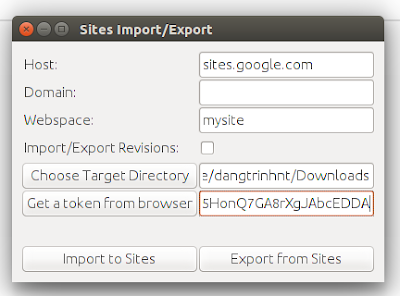
Image
The public Google Sites (old version) does not give you an option to download a backup of your site so it will be a problem if you want to migrate to another place. Fortunately, a project (was originally hosted on Google Code) on Github that can make a copy of your site: "...using HTML Microformats it generates an XHTML version of Sites content suitable for offline browsing and simple HTTP hosting, which is also able to be losslessly imported back into sites." https://github.com/sih4sing5hong5/google-sites-liberation In Ubuntu you can use the tool as follows: 1. Install Java (I tested it with OpenJDK 8) 2. Download the jar package (It's version 1.0.6 when I'm writing this post): https://sih4sing5hong5.github.io/google-sites-liberation/jar/google-sites-liberation-1.0.6-jar-with-dependencies.jar 3. Execute the jar file to open the graphic interface: java -jar google-sites-liberation-1.0.6-jar-with-dependencies.jar With: Host: If not sites.google.c...

Medium to Wordpress migration

Image
Even though the writing and reading experience on the  Medium platform is very great,  I had to move my publication to WordPress because Medium's lack of customization. The following steps showing how I did that: 1. Make sure you expose your medium articles to RSS feeds in full text format: Go to "Homepage and settings" >> Syndication >> Select " Full " >> Click " Save " 2. In your wordpress site, install the WP PIPES plugin, activate it: https://wordpress.org/plugins/wp-pipes/ 3. Then go to the Pipes sidebar menu and set it up: Configuring source (RSSReader, https://your.medium.pulication.url/feed) and destination (post): Mapping fields from feeds and wordpress posts: 4. Click " Test this pipe " and enjoy Note: I haven't found a way to migrate the images to WordPress, so I have to do it manually for now.

Migrate from manual-installed gitlab 7.8.1 to omnibus gitlab-ce 8.14.0

As you may already know, you can only restore your backups in the same gitlab version. So it means that you cannot move your old repositories to the newer version of gitlab using the backup/restore method. Fortunately there is another way to import those repositories into gitlab. Follow these instructions: In my case, I want to migrate my old repositories from a manual-installed gitlab v7.8.1 to omnibus gitlab-ce 8.14.0 instance which were installed on the same server. 1. Create a group folder in the gitlab-ce's repositories directory: sudo -u git mkdir /var/opt/gitlab/git-data/repositories/geniuses 2. Copy the old repositories (repositories in gitlab are bare ones): sudo cp -r /home/git/repositories/* /var/opt/gitlab/git-data/repositories/geniuses/ 3. Correct the permissions of the new folder and all of its sub-directories: sudo chown -R git:git /var/opt/gitlab/git-data/repositories/geniuses/ 4. Import the new copied repositories: sudo gitlab-rake gitlab:import:r...

Wordpress multisite migration with wp-cli

There are many way to migrate a multisite WordPress to a new one including: database import... In my case: I created new blogs for all the users first (in the new multisite, the blog_ids will be different than in the old multisite). Export data of all blogs (wordpress-importer) from the old multisite. (wp-cli) Import data (only posts, comments) exported from the old blogs. (wp-cli) Finally, copy over the media, rename the directory names with the new blog_id. Search and replace all the media links in the database (wp-cli) Here are the details steps: 1. Export data of all the blogs from the old WordPress multisite and transfer to the new one: We need to use my modification of wp-cli ( click here ) to set name of the backup data the blog's path: blog1path.xml, blog2path.xml... This way we will know which file belongs to which blog and user in the new multisite. Assuming: My custom wp-cli source is at /home/myuser/wp-cli/ Wordpress multisite root: /var/www/ Backu...

Moodle - PHP cli script to mass import template course data to all other courses

With the great UI of the Moodle (I'm using version 2.7) you can import data (blocks, activities, filters, questionbank,...) from a template course into a course. But if you want to apply all the template course data to many courses, you have to do manually for every single course. The question is, what if I can automate that process? To solve this problem, I decided to write a php command line script to do the cloning without the web interface. So, the first place I had to look at is the /<dir root>/backup/import.php file. Then, I made some hacks and created my own script at /<dir root>/mycustomscriptfolder/massimport.php : Usage: + To clone the template course data to a single course: $ php massimport.php <template course id> <course id> Example: to apply template course with id = 3 data to course id = 145: $ php massimport.php 3 145 + To clone the template course data to all other courses in your moodle: $ php massimport.php <template ...

How to export Environment Variables in Windows

There is a way to export and import Environment Variables in Windows. That is export the registry keys which store those variables. For System Variables, open registry editor (cmd > regedit): HKEY_LOCAL_MACHINE\SYSTEM\CurrentControlSet\Control\Session Manager\Environment For User Variables: HKEY_CURRENT_USER\Environment Then you can import these registry keys into other windows machines.

Django - Utility bash script to reset the db

The following bash script is used when I want to reset my Django app's db to a fresh state (with some initial data, fixtures) in some test cases: #!/usr/bin/env bash mysqladmin -u myuser -p'myuser_pwd' -f drop dj_ecap mysqladmin -u myuser -p'myuser_pwd' create dj_ecap /home/.venv/myenv/bin/python manage.py syncdb /home/.venv/myenv/bin/python manage.py loaddata path/to/my/fixtures/*.json mysql -u myuser -p'myuser_pwd' -h localhost mydb < path/to/my/fixtures/group.sql The last line is to import some intial groups into django.contrib.auth.models.Group table.