Posts

Showing posts with the label ldap

Moodle user keeps being redirected to user profile page after login and how to fix

One day you noticed a user keeps being redirected to the Moodle's user profile page after she successfully log in and you cannot do anything. I got that problem too and it took me a while to figure out how to fix it. Login to Moodle using an administrator account and update all the required field of that user. Save it and everything will be ok. It's because for some reason your user missing some required information (such as email address in my case). You will wonder how this happens because you cannot create a user if you don't input all the required information. But, there is one scenario this will happen, It's LDAP. When a user login into Moodle the first time, Moodle will create the user as long as it has username. In my case, the user has everything it needs except for the email address. Interesting right? :D

How to fix "/usr/local/lib/libldap_r-2.4.so.2: no version information available" error

When I ran "sudo apt update" this morning these errors showed up: /usr/lib/apt/methods/https: /usr/local/lib/libldap_r-2.4.so.2: no version information available (required by /usr/lib/x86_64-linux-gnu/libcurl-gnutls.s o.4) /usr/lib/apt/methods/https: /usr/local/lib/liblber-2.4.so.2: no version information available (required by /usr/lib/x86_64-linux-gnu/libcurl-gnutls.so. 4) This error means libcurl was compiled with a version of libldap_r other than what I have in /usr/local/lib. So a work around is to symlink the missing files: sudo ln -fs /usr/lib/liblber-2.4.so.2 /usr/local/lib/  sudo ln -fs /usr/lib/libldap_r-2.4.so.2 /usr/local/lib/

LDAP authentication (and groups mapping) with Active Directory that works in Tiki Wiki 16.2

Image
To make the LDAP authentication with MS Active  Directory works in Tiki Wiki 16.2, I have to do the set up both in LDAP and LDAP external groups tabs. 1. In Settings > Control Panels > Log in 2. In General Preferences tab: Authentication method section, select Tiki and LDAP   Uncheck Forgot password Uncheck Users can change their password    click Apply 3. In LDAP tab, set up as following (you may need to switch the Advanced mode on to see more settings): LDAP If user does not exist in Tiki: Create the user Uncheck Create user if not in LDAP  Check Use Tiki authentication for Admin login  LDAP Bind settings Host: ldap://<my-ldap-server-address> Port: 389 Write LDAP debug Information in Tiki Logs: <checked> LDAP Bind Type: Active Directory (username@domain) Search scope: Subtree LDAP version: 3 Base DN: DC=MYDOMAIN,DC=COM LDAP User User DN: OU=All Users (If you want to pull users from a speci...

Get all MS Active Directory group members's email addresses using python

Using python-ldap you can get pretty much out of your MS Active Directory. For example, the following snippet can help you get all the members of a AD group: Usage: $ python ad_utils.py "your group name"

Getting user's DN from Active Directory by username using python-ldap

To get a user's DN from Active Directory by her username you can use the following python snippet I wrote this morning: $ python get_dn_by_username.py myusername Quite useful huh?!

Mass enroll users into a Moodle course

Image
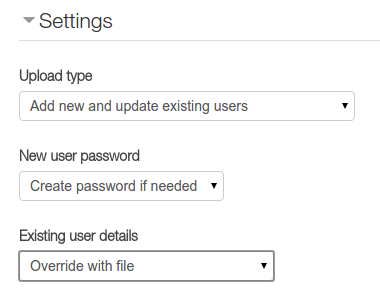
To mass enroll users into a Moodle course, you can use the upload users csv file method as following: Assuming: All the student accounts are in Active Directory and being used to login into Moodle All student (in the csv file) will be enrolled into my-course-short-name course. 1. Prepare the csv file with student information, let's call it students.csv: idnumber,lastname,firstname,email,username,auth,course1,type1,role1,enrolstatus1 102340,Joe,Student One,jstudent1@my.moodle,jstudent1,ldap,my-course-short-name,1,student 102342,Joe,Student Two,jstudent2@my.moodle,jstudent2,ldap,my-course-short-name,1,student ... 2. Go to Site administration > Users > Accounts > Upload users to upload students.csv 3. In the Upload users preview screen, config as following: 4. Click Upload users to finish.

Automatically add new created users (by email or ldap login) to a project in Redmine

Alright, just got this to work a couple minutes ago: * I'm using the Redmine's rake to create issues by fetching email messages ( read this ): RAILS_ENV="production" /usr/bin/rake redmine:email:receive_imap host=imap.gmail.com port=993 ssl=1 username=myemailusername@mydomain.com password=myPassword project=helpdesk unknown_user=create no_permission_check=1 no_account_notice=1 Project id: helpdesk Default user role: Customer * If the email address of the sender is not in Redmine's db, it will create a new user with that email. Let call it joeuser . The problem is the new created user was not added to the project ('helpdesk'), so she will not receive any follow-up email messages (any updates of the ticket). So, I have to modify the Redmine's core to add the new user to the helpdesk project with the Customer role: 1. New user created by the Email task: /path/to/redmine/app/models/mail_handler.rb if addr && !addr.spec.blank?...

Auto create and populate UserProfile in Django 1.7 with django-auth-ldap

To map some extra information of the Active Directory user into my Django's StudentProfile (UserProfile) model (Django 1.7 and django-auth-ldap 1.2.5), I have to call a post_save signal: In my models.py: from django.db import models from django.contrib.auth.models import User from django.db.models.signals import post_save from django_auth_ldap.backend import LDAPBackend class StudentProfile (models.Model): user = models.OneToOneField(User, related_name="student_profile", related_query_name="profile") student_number = models.CharField(max_length=255) # Office class_of = models.CharField(max_length=255) # Description def create_student_profile (sender, instance, created, **kwargs): if created: new_profile = StudentProfile.objects.create(user=instance) user = LDAPBackend().populate_user(instance.username) if user: desc = user.ldap_user.attrs.get("description", [])[0] office = user.ldap_user.attrs.get("physicalDel...

Active Directory authentication in Django

In this article I showed you how to authenticate users of your Django apps against a LDAP server. It's quite easy with open-sourced software huh?! But, if your current infrastructure is built on a proprietary software like MS Active Directory, you will need an extra effort to plug in your Django projects. I will show you how. Read on! Here are the important settings for django-auth-ldap module you need to set: * USER SEARCH : AUTH_LDAP_USER_SEARCH = LDAPSearch("OU=All Users,DC=MYAD,DC=COM", ldap.SCOPE_SUBTREE, ' (SAMAccountName=%(user)s)' ) * GROUP SEARCH : # Set up the basic group parameters. AUTH_LDAP_GROUP_SEARCH = LDAPSearch("OU=User Groups,OU=All Users,DC=MYAD,DC=COM", \                     ldap.SCOPE_SUBTREE, "(objectClass=organizationalUnit)") , #!important! set group type AUTH_LDAP_GROUP_TYPE = NestedActiveDirectoryGroupType() * USER FLAGS : AUTH_LDAP_USER_FLAGS_BY_GROUP = {     "is_active": ["CN=...

Mass reset ActiveDirectory accounts password using the "LTB Self Service Password"

LTB Self Service Password is a small web applications written in php to delegate administrative tasks to users. It is a part of the LTB project ( http://ltb-project.org/wiki/ ). The main functionality of this app is to help the users to self-reset their own Active Directory account's password, but you can leverage its utility functions (php script) to access the Active Directory service. One of the advantages of using the LTB Self Service Password functions is mass resetting a group of AD accounts's password. Here is the working snippet (I used Python to load the accounts list because of the easiness of the csv module): Firstly, make sure that you have installed php5-ldap lib: $ sudo apt-get install php5-ldap massreset.php wrapper.py accounts.csv student_number,lastname,firstname,username 123,Super, Cool,username1 456,Ultra,Awesome,username2 789,Wonder,Who,username3 So, to mass reset password of all the users in accounts.csv, run the following command: ...

OpenLDAP - alock package is unstable

This morning, After making some changes, I fail to start the slapd service, and this is the error log: Mar 31 10:20:30 SRVR-UParentLDAP slapd[16175]: hdb_db_open: database "dc=my,dc=domain,dc=com": alock package is unstable.                                          Mar 31 10:20:30 SRVR-UParentLDAP slapd[16175]: backend_startup_one (type=hdb, suffix=" dc=my,dc=domain,dc=com "): bi_db_open failed! (-1)                            Mar 31 10:20:30 SRVR-UParentLDAP slapd[16175]: slapd stopped.  This error's related to the file permission of ldap db in /var/lib/ldap/ . So, I just change the owner of those files to openldap: # cd /var/lib/ldap/ # chown openldap:openldap -R ./* Then, start the slapd service again: # service slapd start It works like a charm! Reference:  http://serverfault...

Apache Directory Studio, such a useful tool!

Image
Every time I need to do something with the Active Directory, I have to remote desktop to the DC and use the Microsoft's administrative tool. It is quite inconvenient! Now with Apache Directory Studio, I can easily manage the AD in my computer which is a Linux machine. It also supports Windows and Mac OS X platform: Project's official link:  https://directory.apache.org/studio/

LDAP - Migrate the current LDAP Database to a new domain

Here is how I migrated the current LDAP database to a new domain: * Export the old LDAP database to ldif file. * Delete the old databaes * Create a new LDAP database with new domain name * Modify the exported ldif file above to fit the new domain (the root dn) * Import the modified ldif file into the new database Assuming I have a new domain name: dc=my,dc=new,dc=ldap,dc=domain And I want to move all of the existing LDAP data to the new one. I did the following steps: 0. Backup the old LDAP database: # slapcat -v -l old_ldap.ldif 1. Stop the OpenLDAP server: # service slapd stop 2. Delete old LDAP database: # cd /var/lib/ldap # rm -rf *    3. Make sure LDAP is not running: # nano /var/lib/ldap/DB_CONFIG add these following line and save: #DB_CONFIG set_cachesize 0 150000000 1 set_lg_regionmax 262144 set_lg_bsize 2097152 set_flags DB_LOG_AUTOREMOVE 4. Change the current LDAP settings:...

php5-ldap - Useful ldap snipet

This is a super useful php snipet to debug the ldap search: #============================================================================== # Configuration #============================================================================== # LDAP $ldap_url = "ldaps://ldap.server1 ldaps://ldap.server2"; $ldap_binddn = "cn=manager,dc=example,dc=com"; $ldap_bindpw = "P@ssw0rd"; $ldap_base = " dc=example,dc=com "; #$ldap_filter = "(&(objectClass=person)(uid={login}))"; $ldap_filter = "(&(objectClass=user)(sAMAccountName={login})(!(userAccountControl:1.2.840.113556.1.4.803:=2)))"; $login = "genius"; # Connect to LDAP $ldap = ldap_connect($ldap_url); ldap_set_option($ldap, LDAP_OPT_PROTOCOL_VERSION, 3); ldap_set_option($ldap, LDAP_OPT_REFERRALS, 0); # Bind if ( isset($ldap_binddn) && isset($ldap_bindpw) ) { $bind = ldap_bind($ldap, $ldap_binddn, $ldap_bindpw); } else { $bind = ldap_b...

LDAP - Filter syntax example

Example: ldap_filter = "(&(objectClass=user)(|(sn=*{lastname}*)(givenName=*{firstname}*))(!(userAccountControl:1.2.840.113556.1.4.803:=2)))" & => AND |  => OR !  => NOT References: http://www.zytrax.com/books/ldap/apa/search.html

php5-ldap - Search a user in Active Directory

This php snipet helps me to produce an ldap search against an Active Directory using php5-ldap: <?php #============================================================================== # Configuration #============================================================================== # LDAP $ldap_url = "ldaps://<ldap server 1 ip> ldaps://<ldap server 2 ip>"; #$ldap_binddn = "cn=manager,dc=example,dc=com"; $ldap_binddn = "CN=Admin,OU=ArtificialUsers,DC=MyDomain,DC=COM"; $ldap_bindpw = "P@ssw0rd"; $ldap_base = "DC=MyDomain,DC=COM"; $ldap_filter = "(&(objectClass=user)(sAMAccountName={login})(!(userAccountControl:1.2.840.113556.1.4.803:=2)))"; #============================================================================== # POST parameters #============================================================================== # Initiate vars $result = ""; $login = ""; $ldap = "...

Authenticate user via LDAP in Django

To authenticate your user via a LDAP server, we need: - python-ldap module: install this before install django_auth_ldap: $ sudo apt-get install libsasl2-dev python-dev libldap2-dev libssl-dev $ pip install python-ldap - django_auth_ldap module:  http://pythonhosted.org/django-auth-ldap/ Add the following settings to your Django settings.py : ######################################################################## # LDAP Authentication ######################################################################## import ldap from django_auth_ldap.config import LDAPSearch, GroupOfNamesType, PosixGroupType #AUTH_LDAP_START_TLS = True AUTH_LDAP_GLOBAL_OPTIONS = { ldap.OPT_X_TLS_REQUIRE_CERT: False, ldap.OPT_REFERRALS: False, } # Baseline configuration. AUTH_LDAP_SERVER_URI = "ldap://my.ldap.domain" AUTH_LDAP_BIND_DN = "cn=admin,dc=my,dc=ldap,dc=domain" AUTH_LDAP_BIND_PASSWORD = "myP@ssw0rd" AUTH_LDAP_USER_SEARCH = LDAPSearch(...