Posts

Showing posts with the label migration

Install Konga on K8S

Even though when running Kong API Gateway in K8S, It's recommended to use the yaml descriptive files to create the routes and services for your applications, you can use the Kong Admin API [3] and the Konga web interface [2] for those tasks. This tutorial shows you how to install Konga on your K8S cluster using helm (I based on [1] and added support for pod annotations). All source code and the helm chart used in this tutorial are at [0]. Prerequisites: - You have the master role in your K8S cluster to install new applications, create ingresses, etc. - Kong API Gateway (Kong Ingress Controller) has been installed on your K8S cluster and in the kong namespace - You have full privileges to create a new Postgres database for your Konga Install Konga on K8S: 1. Create the Postgres DB for your Konga CREATE USER konga; CREATE DATABASE konga OWNER konga; ALTER USER konga WITH PASSWORD <your secret>; 2. Prepare the values.yaml fi...
Django DB migration when you're using a custom MySQL installation dir

For some reason, you installed MySQL in a different path than the default /etc/mysql/. Then if you run the Django's migrate command, it will fail because It cannot communicate with the MySQL process: django.db.utils.OperationalError: (2002, "Can't connect to local MySQL server through socket '/var/run/mysqld/mysqld.sock' (2)") If that's the case, you can use the following option in your Django's configuration to indicate the socket directory of MySQL: DATABASES = {     'default': {         'ENGINE': 'django.db.backends.mysql',         'OPTIONS': {             'read_default_file': '/path/to/my.cnf',         },     } } That's it. Profit!!!

Backup and Restore your Google Site

Image
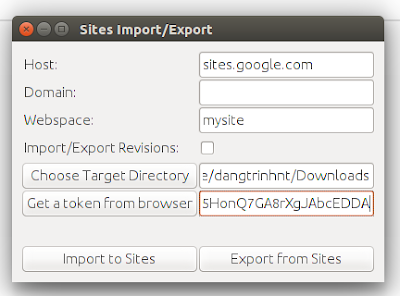
The public Google Sites (old version) does not give you an option to download a backup of your site so it will be a problem if you want to migrate to another place. Fortunately, a project (was originally hosted on Google Code) on Github that can make a copy of your site: "...using HTML Microformats it generates an XHTML version of Sites content suitable for offline browsing and simple HTTP hosting, which is also able to be losslessly imported back into sites." https://github.com/sih4sing5hong5/google-sites-liberation In Ubuntu you can use the tool as follows: 1. Install Java (I tested it with OpenJDK 8) 2. Download the jar package (It's version 1.0.6 when I'm writing this post): https://sih4sing5hong5.github.io/google-sites-liberation/jar/google-sites-liberation-1.0.6-jar-with-dependencies.jar 3. Execute the jar file to open the graphic interface: java -jar google-sites-liberation-1.0.6-jar-with-dependencies.jar With: Host: If not sites.google.c...

How to install and start E-commerce service in Open edX navetive installations (Ubuntu 16.04)

Assumptions: You are installing this on an AWS instance of Ubuntu 12.04, 64-bit You have at least 30GB of space assigned to the root drive These instructions are as current as of the Fiscus.3 platform release 1. Update and install system dependencies sudo apt-get update -y sudo apt-get install -y build-essential software-properties-common python-software-properties curl git-core libxml2-dev libxslt1-dev libfreetype6-dev python-pip python-apt python-dev libxmlsec1-dev swig libmysqlclient-dev sudo pip install --upgrade pip sudo pip install --upgrade virtualenv 2. Clone the edx configuration repository and install edX and ecommerce cd /var/tmp git clone https://github.com/edx/configuration cd /var/tmp/configuration sudo pip install -r requirements.txt sudo pip install setuptools --upgrade cd /var/tmp/configuration/playbooks nano -w edx_sandbox.yml * Inside the edx_sandbox.yml file, change the SANDBOX_ENABLE_ECOMMERCE flag from False to True. sudo ansible...

Medium to Wordpress migration

Image
Even though the writing and reading experience on the  Medium platform is very great,  I had to move my publication to WordPress because Medium's lack of customization. The following steps showing how I did that: 1. Make sure you expose your medium articles to RSS feeds in full text format: Go to "Homepage and settings" >> Syndication >> Select " Full " >> Click " Save " 2. In your wordpress site, install the WP PIPES plugin, activate it: https://wordpress.org/plugins/wp-pipes/ 3. Then go to the Pipes sidebar menu and set it up: Configuring source (RSSReader, https://your.medium.pulication.url/feed) and destination (post): Mapping fields from feeds and wordpress posts: 4. Click " Test this pipe " and enjoy Note: I haven't found a way to migrate the images to WordPress, so I have to do it manually for now.

Migrate from manual-installed gitlab 7.8.1 to omnibus gitlab-ce 8.14.0

As you may already know, you can only restore your backups in the same gitlab version. So it means that you cannot move your old repositories to the newer version of gitlab using the backup/restore method. Fortunately there is another way to import those repositories into gitlab. Follow these instructions: In my case, I want to migrate my old repositories from a manual-installed gitlab v7.8.1 to omnibus gitlab-ce 8.14.0 instance which were installed on the same server. 1. Create a group folder in the gitlab-ce's repositories directory: sudo -u git mkdir /var/opt/gitlab/git-data/repositories/geniuses 2. Copy the old repositories (repositories in gitlab are bare ones): sudo cp -r /home/git/repositories/* /var/opt/gitlab/git-data/repositories/geniuses/ 3. Correct the permissions of the new folder and all of its sub-directories: sudo chown -R git:git /var/opt/gitlab/git-data/repositories/geniuses/ 4. Import the new copied repositories: sudo gitlab-rake gitlab:import:r...

Wordpress multisite migration with wp-cli

There are many way to migrate a multisite WordPress to a new one including: database import... In my case: I created new blogs for all the users first (in the new multisite, the blog_ids will be different than in the old multisite). Export data of all blogs (wordpress-importer) from the old multisite. (wp-cli) Import data (only posts, comments) exported from the old blogs. (wp-cli) Finally, copy over the media, rename the directory names with the new blog_id. Search and replace all the media links in the database (wp-cli) Here are the details steps: 1. Export data of all the blogs from the old WordPress multisite and transfer to the new one: We need to use my modification of wp-cli ( click here ) to set name of the backup data the blog's path: blog1path.xml, blog2path.xml... This way we will know which file belongs to which blog and user in the new multisite. Assuming: My custom wp-cli source is at /home/myuser/wp-cli/ Wordpress multisite root: /var/www/ Backu...

edx-platform - A first look at paver in Open edX

Yesterday, I noted that the edx team has moved the edx-platform build system away from rake and use paver instead: https://groups.google.com/d/msg/edx-code/0duQswYtjqg/A6HOFR_npjcJ And when I was trying to create a script to update my custom theme from the git repo, I got some feedback and advice to use the paver tool of edx-platform instead for the sake of simplicity : https://groups.google.com/d/msg/edx-code/ozqkmW3ll10/dsr4TbG3fAUJ So, I took a while to look into the /edx-platfrom/paverlib/ to see how to use paver , what are the available options of paver in Open edX? Here they are: edxapp@demo:/edx/app/edxapp/edx-platform$ paver help ---> paver.tasks.help Usage: paver [global options] taskname [task options] [taskname [taskoptions]] Options:   --version             show program's version number and exit   -n, --dry-run         don't actually do anything   -v, --verbose        ...

edx-platform - Error when accessing Course Creator link in the django admin interface of CMS

After logged in into the django admin interface of CMS (/admin) as superuser, click the Course Creator link, I got this error: DatabaseError: (1146, "Table 'edxapp.course_creators_coursecreator' doesn't exist") First, I tried to migrate the db of edx following the official wiki of Open edX (https://github.com/edx/configuration/wiki/edX-Managing-the-Production-Stack) sudo -u www-data /edx/bin/python.edxapp ./manage.py lms syncdb --migrate --settings aws But not thing changed. After a while, I noted the migrating command, It only migrates the lms, not the cms. So, gotcha! I just need to migrate the db of CMS and everything will be fine: sudo -u www-data /edx/bin/python.edxapp ./manage.py cms syncdb --migrate --settings aws

edX-platform - Updating edX production stack's versions using edX repos

To update your Open Edx instance to the latest version from a repository (master branch of edx-platform, mybranch,... ) run the following command: $ sudo /edx/bin/update edx-platform master After the updating finish successfully, run the db migration command: $ cd /edx/app/edxapp/edx-platform/ $ sudo -u www-data /edx/app/edxapp/venvs/edxapp/bin/python ./manage.py lms syncdb --migrate --settings aws Finally, restart the edx's services: * LMS/CMS: sudo /edx/bin/supervisorctl -c /edx/etc/supervisord.conf restart edxapp: * Workers: sudo /edx/bin/supervisorctl -c /edx/etc/supervisord.conf restart edxapp_worker: References : https://github.com/edx/configuration/wiki/edX-Managing-the-Production-Stack