Posts

Showing posts with the label k8s

Install Konga on K8S

Even though when running Kong API Gateway in K8S, It's recommended to use the yaml descriptive files to create the routes and services for your applications, you can use the Kong Admin API [3] and the Konga web interface [2] for those tasks. This tutorial shows you how to install Konga on your K8S cluster using helm (I based on [1] and added support for pod annotations). All source code and the helm chart used in this tutorial are at [0]. Prerequisites: - You have the master role in your K8S cluster to install new applications, create ingresses, etc. - Kong API Gateway (Kong Ingress Controller) has been installed on your K8S cluster and in the kong namespace - You have full privileges to create a new Postgres database for your Konga Install Konga on K8S: 1. Create the Postgres DB for your Konga CREATE USER konga; CREATE DATABASE konga OWNER konga; ALTER USER konga WITH PASSWORD <your secret>; 2. Prepare the values.yaml fi...
How to clean up Kong-Ingress-Controller

You can use this following shell script that I wrote a couple days ago to clean up Kong-Ingress-Controller:

How to open a custom port on the istio-ingressgateway

By default, when you deploy istio on a Kubernetes cluster, it will create a load balancer name istio-ingressgateway [1]. That ingress gateway is a Kubernetes's LoadBalancer resource that helps handling incoming traffic into the mesh. You can check by running this command: kubectl -n istio-system get service istio-ingressgateway The istio-ingressgateway load balancer will open a number of ports such as 80, 443, etc. If you want to open a new port on the load balancer, you can do like the following: 1. Export the current configuration of the istio-ingressgateway kubectl -n istio-system get service istio-ingressgateway -o yaml > istio_ingressgateway.yaml 2. Edit the istio_ingressgateway.yaml, add the new port you want, for example nano istio_ingressgateway.yaml ...   - name: myport     nodePort: 31410     port: 5000     protocol: TCP     targetPort: 5000 ... 3. Apply the new configuration kubectl apply -f istio_ingress...

Up and Running with Red Hat CodeReady Workspace IDE

Image
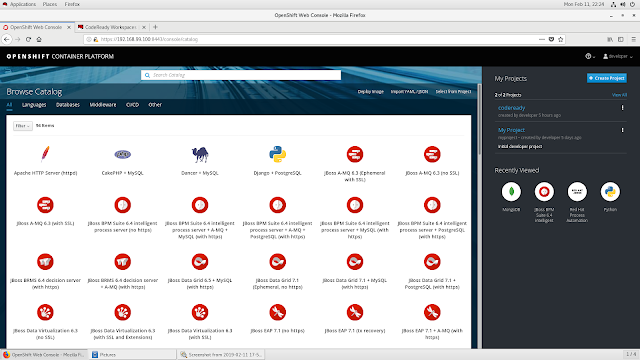
Just another IDE? Yeah, you got it right, just another IDE. But this time, It's a special IDE designed for the Kubernetes developers. CodeReady Workspace IDE [1] includes tools and the dependencies that are needed to code, build, test, run, and debug the applications that run inside your Kubernetes clusters. It's hard to find the getting started guides in the Red Hat developer page so I tried and note it down here. A. First, you need to have a running OpenShift Container Platform (OCP) instance Right now CodeReady Workspace only works inside the OCP as far as I know [2] (there may be hackers out there know how to make it work in other platforms). The easiest way is to use the Red Hat Container Development Kit (CDK) [3] which helps you to have a smaller scale version of the OCP up and running, the minishift [4]. And, in order to install the CDK successfully, the recommended way is to install it inside a Red Hat Enterprise Linux (RHEL) server, register a Red Hat Developer acc...