Posts

Just a great quote from "On Liberty" by John Stuart Mill

Image
"No society in which these liberties are not, on the whole, respected, is free, whatever may be its form of government; and none is completely free in which they do not exist absolute and unqualified. The only freedom which deserves the name, is that of pursuing our own good in our own way, so long as we do not attempt to deprive others of theirs, or impede their efforts to obtain it. Each is the proper guardian of his own health, whether bodily, or mental and spiritual. Mankind are greater gainers by suffering each other to live as seems good to themselves, than by compelling each to live as seems good to the rest." ~"On Liberty" by John Stuart Mill.   John  Stuart Mill   (1806-1873) (source: http://en.wikipedia.org/wiki/John_Stuart_Mill)

What did I learn from Hack Jam Saigon the First?

Image
Last Sunday (31 October 2013), I hosted a Hack Jam, the first Hack Jam in Ho Chi Minh City. It didn't happen as I had planed. But, there were a lot of things I've learned. We had snacks, we had water...I though we had everything we needed. But "life is not always as you expected". A lot of mistakes, a lot of wrong things. Among all of these "bugs", these are 2 important things that failed the event: 1. The Internet Connection: The biggest problem was the poor Internet connection. It's just too slow when 10 persons tried to connect to the wi-fi. I intended to introduce some great tools such as: + TogetherJS : transform your website into a collaborative environment + Thimble : an online HTML editor + Popcorn : an online media builder + Modpad : a collaborative notes taking tool based on Etherpad We could only see through some of the tools. And that's all. Hopefully, the hackers were somehow amazed by the usefulness of those applications. ...

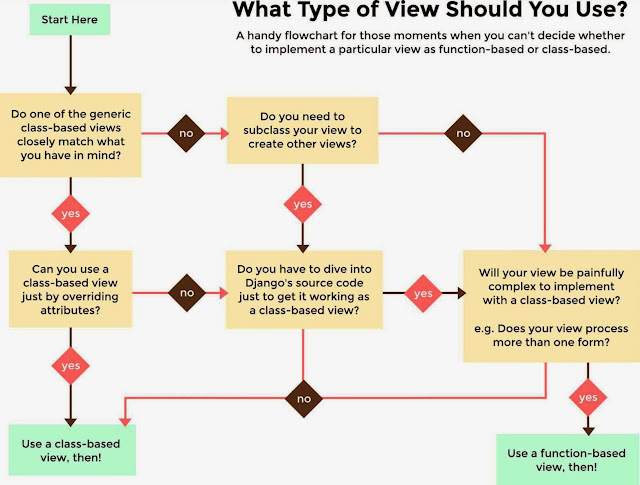
Django - When should we use Function-based and Class-based views?

Image
This flowchart explains when we use Function-based views and when we should use Class-based views instead: (source: Two Scoops of Django by Daniel Greenfeld and Audrey Roy)

How to install wxPython inside a virtualenv environment

python-pip does not contain wxPython module. So, to use it inside an virtualenv environment (e.g.: /home/.venv/myenv/): 1. Install it system-wide: $ sudo apt-get install python-wxgtk2.8 2. Make a symbolic link of wxPython to the virtualenv: $ ln -s /usr/lib/python2.7/site-packages/wx* /home/.venv/myenv/lib/python2.7/site-packages/ Update: In xUbuntu 12.04: $ ln -s /usr/lib/python2.7/dist-packages/wx* /home/.venv/myenv/lib/python2.7/site-packages/

Migrate all my Django projects to v1.5.5

It is really great when accomplishing something. To me, It's migrate all my Django projects to the latest stable version of Django (1.5.5, when I write this blog post). There are something I want to take notes: 1. Replace/remove all the obsoleted methods, functions , especially the generic views . The function based generic views are replaced completely by the class based views in Django 1.5. For example: # from django.views.generic.list_detail import object_list # from django.views.generic.create_update import create_object (Function-based generic views such as direct_to_template and object_list were deprecated in Django 1.3 and removed in 1.5.) For more information about class based views and how to migrate from function based views: + https://docs.djangoproject.com/en/1.3/topics/generic-views-migration/ + https://docs.djangoproject.com/en/1.5/topics/class-based-views/generic-display/ 2. Replace/remove settings keywords, and add new required ones . Something lik...

LDAP - Migrate the current LDAP Database to a new domain

Here is how I migrated the current LDAP database to a new domain: * Export the old LDAP database to ldif file. * Delete the old databaes * Create a new LDAP database with new domain name * Modify the exported ldif file above to fit the new domain (the root dn) * Import the modified ldif file into the new database Assuming I have a new domain name: dc=my,dc=new,dc=ldap,dc=domain And I want to move all of the existing LDAP data to the new one. I did the following steps: 0. Backup the old LDAP database: # slapcat -v -l old_ldap.ldif 1. Stop the OpenLDAP server: # service slapd stop 2. Delete old LDAP database: # cd /var/lib/ldap # rm -rf *    3. Make sure LDAP is not running: # nano /var/lib/ldap/DB_CONFIG add these following line and save: #DB_CONFIG set_cachesize 0 150000000 1 set_lg_regionmax 262144 set_lg_bsize 2097152 set_flags DB_LOG_AUTOREMOVE 4. Change the current LDAP settings:...

Debian - How to fix Perl warning about locales

When I restarted the lighttpd service, the console raised this warning: perl: warning: Setting locale failed. perl: warning: Please check that your locale settings: LANGUAGE = (unset), LC_ALL = (unset), LC_CTYPE = "UTF-8", LANG = "en_GB.UTF-8" are supported and installed on your system. perl: warning: Falling back to the standard locale ("C"). It is because the locales settings of the system was not configured properly. So, to fix this, run the following command: # dpkg-reconfigure locales And choose the correct locale file, in my case, it is "en_US.UTF-8".