Posts

Reset Wordpress admin's password through MySQL

This tutorial is from the wordpress documentation  http://codex.wordpress.org/Resetting_Your_Password : Get an MD5 hash of your password. Visit md5 Hash Generator , or... Create a key with Python. or... On Unix/Linux: Create file wp.txt with the new password in it (and *nothing* else) md5sum wp.txt rm wp.txt " mysql -u root -p " (log in to MySQL)

Ubuntu - Auto-mount your partitions

I have some partitions and I want to tell the system to mount those partitions automatically whenever my computer restarts. I heard that Ubuntu 13.04 has some great feature that have GUI to make the job easier, Disks. I tried to use it: 1. Open Disks from the Ubuntu Application Launcher, and choose the partition I want, let call it Partition 6. 2. Click the gear icon (settings), choose Edit Mount Options. 3. Turn off Automatic Mount Options and enter the information for my partition. Then, click OK I'd thought it gonna work, but it's not. I got an error about some wrong options when I mount the partition. After awhile googling around, I found a thread from the Linux Mint forum which tells me not to use the Disks utilities of Ubuntu, but modifying the fstab directly instead: Note: You might want to run the following command to make sure it really has that UUID number and that it is in fact formatted to ext3: sudo blkid -c /dev/null

Android - Host your Linux images with DriveDroid

Yeah, It's true. You can host your Linux images (Ubuntu, Xubuntu, debian, fedora...) in your Android devices and boot from it. Now with DriveDroid , You don't need any dedicated USB drive or CDs/DVDs which are in a special format (FAT...) to be able to boot from. Everything you need to do are some super simple steps: 1. Install DriveDroid from the Google Play market:  https://play.google.com/store/apps/details?id=com.softwarebakery.drivedroid&hl=en 2. Download any Linux Image you want. I recently host the Xubuntu in my Android phone with DriveDroid ( http://xubuntu.org/ ). And then copy the image to /storage/sdcard0/Download/images . 3. On your Android phone, turn on DriveDroid, select the image to let your phone host the file over USB. 4. Restart your computer (make sure that you've set up to boot from USB as the first priority) 5. Enjoy Note: You can host many Linux images on your phone with DriveDroid .

Reset my password in Ubuntu

I want to write down the "how-to" of resetting password in Ubuntu (in my case It's is Ubuntu v12.10) which is not something new, but helpful: 1. Reset the computer and press or hold down the Shift key the see the Grub menu, and choose Advanced options for Ubuntu 2. Select the first recovery mode item on the list 3. Choose root - Drop to root shell prompt 4. Remount the root directory by entering the following command: mount -rw -o remount / 5. Reset my password: passwd trinh Note: "trinh" here is my username

I've rooted my Android phone

Today, after a while, I decided to root my Lenovo p770 which is running Android v4.1.1. I followed the guide from the xda forum:  http://forum.xda-developers.com/showthread.php?t=2220275 Here are some issues I faced along the way: 1. At step 4a (Guide for rooting your phone (using CWM) and Google Apps (optionally) , install the   Root_by_javum.zip file : When booting to CWM, I saw the menu "apply zip from sdcard" instead of " “install zip from sdcard ", and the menus are in yellow or brown color. After awhile re-tried the 3rd step of the guide ( 3) Guide for Winflash recovery flashing, including CWM (Clockwork Mod Recovery)  ), I finally saw the corrected menu ("install zip from sdcard", and the menus are in blue color ) 2. Step 4b, install Google play: Have to start the 3rd step again. 3. After my phone had been rooted, all of apps stopped working: - I forgot to adjust the correct date/time settings. After set the right date and time, e...
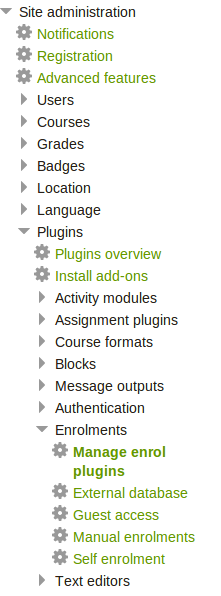
Moodle - Using external database for courses enrolment

Image
The Moodle v2.5 gives us a very cool plugin for enrolment with pre-defined courses, teachers, and students data which are stored in an external database. You can enable that plugin following these steps: - Log-in to your moodle using the site administrator account, in the Plugins sections of Site administration menu, select Enrolments , then select Manage enrol plugins :

Python - Convert a list of string into a list of integer

Assuming I have a list of strings like the following: my_list = ['1', '2', '3'] and then I want to make it a list of integer: my_list = map(int, my_list) That's it!