Posts

Django - Use the Django admin app's FilteredSelectMultiple widget in form
Image
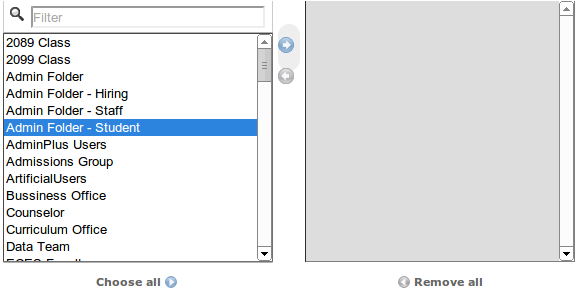
To use the  FilteredSelectMultiple widget of the Django admin app you have to do several things: 0. Include FilteredSelectMultiple widget: from django.contrib.admin.widgets import FilteredSelectMultiple 1. Define the form, for example: class MyForm (forms.Form): first_name = forms.CharField(max_length=100) groups = forms. ModelMultipleChoiceField (\ widget= FilteredSelectMultiple ("Groups", is_stacked=False),\ queryset=models.Group.objects.all()) class Media : css = {'all': (' /static/admin/css/widgets.css ',),} js = (' /admin/jsi18n ',) Notes: * /static/ is my  STATIC_URL setting and I also copy the static admin folder from Django source. * You also need to define the url pattern for jsi18n path in urls.py : ... (r'^admin/jsi18n/$', 'django.views.i18n.javascript_catalog'), ... 2. Include necessary css and js in the template: ... <script type="text/javascript" src=...

Drupal - Enable Clean URLs in Drupal 7 with Nginx

To enable Clean URLs in Drupal 7 with Nginx, using this following rule: >> /etc/nginx/sites-available/mysite server {         listen 80;         server_name [host];         root /var/www/[document_root]; ## <-- Your only path reference.         # Enable compression, this will help if you have for instance advagg module         # by serving Gzip versions of the files.         gzip_static on;         location = /favicon.ico {                 log_not_found off;                 access_log off;         }         location = /robots.txt {                 allow all;                 log_not_found off;         ...

Drupal - Using Drush to update Drupal core

Drupal does not allow us to upgrade Drupal core using the admin interface the way Wordpress does. We have to manually do it ourself. I meant, backup, download the drupal-core source file, copy the new files and folders exclude the " sites " directory into the old drupal root path. Quite a lot of work. Luckily, a genius ( :D) has created a tool name DRUSH to do the management stuffs including upgrade drupal core, modules...completely in command line. The core developers of drush has published the source code of drush in github: https://github.com/drush-ops/drush "Drush is a command-line shell and scripting interface for Drupal, a veritable Swiss Army knife designed to make life easier for those who spend their working hours hacking away at the command prompt." This morning, I've just upgrade my drupal site to the latest drupal core (7.26)  by running the following drush command: $ cd /path/to/drupal/site $ drush pm-update drupal-7.26 The output is s...

Preparing for my PyCon2014 trip

Image
I will attend the PyCon 2014 conference in Montreal, Canada, this April. I can meet the creator of Python and any other superstars in the Python world. And to be able to be there, I need to do something. First of all, purchase the conference ticket . Luckily, I'm granted the Financial Aid of PyCon2014, so I can attend the conference for free (just the 3 days conference). Secondly, I have to buy a flight ticket to Montreal to be able to apply for the VISA. The ticket price is so high (around $1600 USD). So, I am applying for the PD fund of my school to support me this. That PD fund plus $100 USD travel grants from the PyCon organizer might give me a break. Next thing I need to care about is to find a place to stay in Montreal. Fortunately, some friends from the Foulab Makerspace (in Montreal) are willing to accommodate me. I'm just so thankful for that! And finally, my trip will only be successful if I can get the VISA to Canada. There are a lot of paperworks. So, t...

Ubuntu - Fix "W: GPG..." key error

Sometimes, You run "sudo apt-get update" and get this kind of error: W: GPG error: http://extras.ubuntu.com precise Release: The following signatures couldn't be verified because the public key is not available: NO_PUBKEY 16126D3A3E5C119 2 It is because your apt misses that public key. So, to fix this issue, just run the following command to add the need key: $ sudo apt-key adv --keyserver keyserver.ubuntu.com --recv-keys 16126D3A3E5C1192 then run update again: $ sudo apt-get update If the above method does not work, try this: $ sudo apt-get clean $ cd /var/lib/apt $ sudo mv lists lists.old $ sudo mkdir -p lists/partial $ sudo apt-get clean $ sudo apt-get update

Drupal - Install OpenAcademy distribution with Nginx, php5-fpm, and MariaDB in Ubuntu12.04

OpenAcademy is a Drupal distribution which is used for higher education (or whatever you want :D). This blog post is about installing and setting up the full stack (including nginx, php5-fpm, mariadb, drupal, openacademy) to make a working website: 1. Install MariaDB, create a database for drupal: Go to https://downloads.mariadb.org/mariadb/repositories, and select the appropriate mirror for your mariadb installation. In my case, I install the dbms in Ubuntu 12.04, mariadb 5.5, so the installation procedure is as following $ sudo apt-get install python-software-properties $ sudo apt-key adv --recv-keys --keyserver hkp://keyserver.ubuntu.com:80 0xcbcb082a1bb943db $ sudo add-apt-repository 'deb http://ftp.kaist.ac.kr/mariadb/repo/5.5/ubuntu precise main' $ sudo apt-get update $ sudo apt-get install mariadb-server 2. Install and  config php5-fpm: * Install php5-fpm: $ sudo apt-get install php5-fpm php5-mysql * Open php config file: $ sudo nano /etc/...

Nginx + Wordpress + SSL configuration

Sometimes you need to harden your wordpress blog with ssl. It's pretty simple. 1. Create your self-signed ssl certificate (as in previous blog post ): $ sudo mkdir /etc/myssl_cert $ cd /etc/myssl_cert $ openssl genrsa 1024 > wordpress.key $ sudo chmod 400 wordpress.key $ openssl req -new -x509 -nodes -sha1 -days 1780 -key wordpress.key > wordpress.crt $ openssl x509 -noout -fingerprint -text < wordpress.crt > wordpress.info 2. Configure nginx to support ssl connection: /etc/nginx/sites-available/wordpress : ... # HTTPS server # server {         listen 443;         server_name your.domain.com;         root /var/www;         index index.php index.html index.htm;         ssl on;         ssl_certificate /etc/myssl_cert/wordpress.crt;    ...