Posts

Install Konga on K8S

Even though when running Kong API Gateway in K8S, It's recommended to use the yaml descriptive files to create the routes and services for your applications, you can use the Kong Admin API [3] and the Konga web interface [2] for those tasks. This tutorial shows you how to install Konga on your K8S cluster using helm (I based on [1] and added support for pod annotations). All source code and the helm chart used in this tutorial are at [0]. Prerequisites: - You have the master role in your K8S cluster to install new applications, create ingresses, etc. - Kong API Gateway (Kong Ingress Controller) has been installed on your K8S cluster and in the kong namespace - You have full privileges to create a new Postgres database for your Konga Install Konga on K8S: 1. Create the Postgres DB for your Konga CREATE USER konga; CREATE DATABASE konga OWNER konga; ALTER USER konga WITH PASSWORD <your secret>; 2. Prepare the values.yaml fi...
Running Selenium with chromedriver inside a Windows container

Image
Running Selenium for Web UI testing in a Windows container is a little bit tricky. I spent a week on this and finally could make it to work thanks to the idea in [1]. Woohuu! Let's take a look at this sample Java application that runs Selenium with chromedriver. 1. Make sure your Desktop Docker running with Windows Container mode 2. In your Dockerfile, make sure: Install the needed fonts (googlechrome) => this is the most important thing!   ADD files/fonts.tar /Fonts/ WORKDIR /Fonts/ RUN @powershell -NoProfile -ExecutionPolicy Bypass -Command ".\Add-Font.ps1 Fonts" Enable Web-WebSockets feature using Powershell RUN @powershell -NoProfile -ExecutionPolicy Bypass -Command "Add-WindowsFeature Web-WebSockets" Install chocolatey to install openjdk8, and googlechrome RUN @powershell -NoProfile -ExecutionPolicy Bypass -Command "iex ((New-Object System.Net.WebClient).DownloadString('https://chocolatey.org/install.ps1'))" && SET "PATH=%...

Build and run Windows container

Image
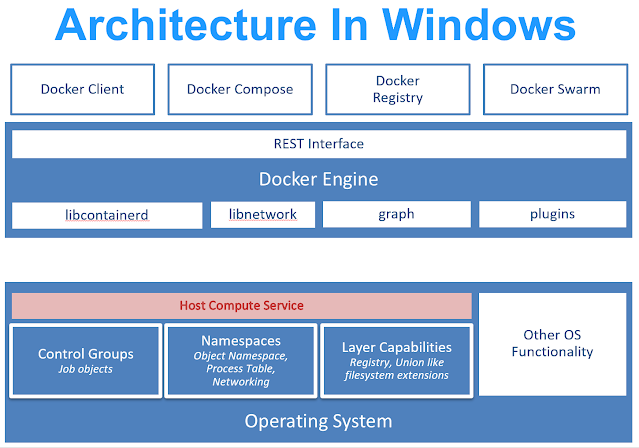
Running Windows container... wait what? Windows??? WTF? Okay, take it easy genius! It gonna be alright! Microsoft has been working closely with Docker to add containerized applications for its OS platform. And, it's working nicely even though at first you will feel the pain in the ass. There are a couple of things you need to take into account working with Windows container First of all, you have to use a Windows machine to build and run Windows containers. Containers are using the underlying Operating System resources and drivers, so Windows containers can run on Windows only (Linux containers can run on Windows with WSL enabled). If you're using Docker Desktop on Windows 10, you have to use it with Windows Container enabled. There will be no GUI Windows environment (servercore or nanoserver) [1]. Of course, it's containers! There will be no "latest" tag for your Windows base docker image. Powershell is the King [2]. Just like any Linux container, you have to use...

Use BFS algorithm to find the accessible area of a robot in a 2D graph

Image
Recently, I found myself started to love working with algorithms. The funny thing is I was never interested in algorithms back in my university time. Maybe because I'm more attracted to something that has a visual appearance or has real-life applications, something like Physics I thought. After more than 10 years working in the field of cloud computing, networks, and computer system, I realized everything are operating by algorithms. Algorithms to optimize network configurations, algorithms to make the application process faster, algorithms to auto-scale the clusters, etc. It may be a little bit too late but right now I can tell algorithms are beautiful. I tried some HackerRank coding challenges and the problem below caught my eye because it's used in pathfinder, searching, etc. They can be very useful for a cloud architect like myself when optimizing network configurations or building some automation apps. The Problem: There is a robot that can move around on a grid. The robot...

Dockerize your development environment

Image
Recently, a friend of mine asked me about how I set up my development so that it's easy to move onto production without many issues such as the differences between the environments, dependencies, etc. Here are a couple of questions. Deploy Dev environment + staging environment in containers? Is deploying a big container and stuffing all packages reasonable? What are the differences between Python container vs Ubuntu container? and which one to use? Can Dockerfile execute commands or scripts (e.g., automatically create users, run an existing script, etc.)? When deploying the application with the container, how are the logs collected? How to handle the versioning process? So your company is on the way to streamline the process of developing, testing, and deploying software to production? But you are confused because there are so many tools out there such as Kubernetes, the "CI/CD universe" and stuff, ain't you? No problem. You just need to get started with...

Kong for your microservices

Image
The Kong API Gateway [1] has been around for some time and it has been evolving from an APIs Management solution to an industry-standard tool for the cloud-native environments. People are choosing Kong because it is super easy to set up and operate, as well as its capability to scale and extend with plugins. I have been a Kong user and administrator for a while as a DevOps engineer, and I think I should write down my experience with it before too many new things take over my head. This article will focus on a deployment strategy for Kong in a microservice architecture [2]. CONTENTS Introduction Kong's architecture Kong for microservices Common issues & what we can improve INTRODUCTION A quick introduction of Kong and Microservice Architecture could be a great way to get started. Kong We can summarize Kong as follows. Open-source cloud-native, fast, scalable, and distributed Microservice Abstraction Layer. It means that Kong can be deployed in containerized e...

Delete all Kong targets using bash

Some times I just want to delete all the Kong targets and redeploy all the APIs to troubleshoot some issues. So, I wrote the below bash script: Usage ./clean_all_kong_targets.sh kong.dangtrinh.com:8001

Scale multiple ECS services at once

You use the following bash script I wrote to scale multiple ECS services at once: Prerequisite - AWS CLI [1] - An IAM account that has permission to update or scale ECS services - A text file that contains all the ECS service names, each line contains 1 service name. For example: service1 service2 ... Usage ./mass_scale_ecs_svc.sh <cluster name> <path to the ECS service names text file> <desired count, e.g., 0> References: [1]  https://aws.amazon.com/cli/

Create a sock proxy to a private network

Last week, I wrote a bash script that can be used to create a sock proxy that connects my computer and a private network via a bastion server (the bastion server is a server that sitting inside a private network that I can ssh into using a pem key). Usage: ./gen_sockproxy.sh /path/to/sshkey.pem <bastion_username> <bastion_address> It will output the sock proxy address. For example:  socks5://localhost:13000

Add MetalLB to MicroK8S

Image
There is a question that pops up inside my head every time I work with Kubernetes [1], " Why the hell does it not implement a network load balancer? ". It did have network load balancers but tied to public cloud providers (e.g., AWS, GCP, etc.). What if I want to run Kubernetes clusters in my private clouds or even in my bare-metal infrastructures? Fortunately, I found  MetalLB [2]. "MetalLB hooks into your Kubernetes cluster, and provides a network load-balancer implementation. In short, it allows you to create Kubernetes services of type “LoadBalancer” in clusters that don’t run on a cloud provider, and thus cannot simply hook into paid products to provide load-balancers." ~MetalLB documentations. So, whenever I spin up a new Kubernetes cluster in my bare-metal infrastructures (or for my MicroK8S [4] clusters), I normally have to deploy MetalLB and with Layer 2 configuration as depicted in figure 1. There are also other configurations such as BGP, automatic ...

To get a random available port in your *nix-based machine

For example, If I want to get a random port from the 3000-3999 port pool, I would run the following command in the terminal: comm -23 <(seq 3000 3999 | sort) <(ss -tan | awk '{print $4}' | cut -d':' -f2 | sort -u) | shuf | head -n 1

Manipulate your yaml file with yq

I like to play with bash shell especially when I have to manipulate template files of some sort on the go (dynamically). yq is a great tool I just figured out that can help me to generate SAM [1] template.yaml file based on some business logic. The great thing about yq is that I don't have to install it to be able to run it with the help of docker. So, add this to my bash script yq ( ) { docker run --rm -i -v ${PWD} :/workdir mikefarah/yq yq $@ } and than I can use yq as if I installed it, for example: yq d template.yaml 'Resources.AllOutboundSG' Read [2] to know more about how to use yq. References: [1]  https://docs.aws.amazon.com/serverless-application-model/latest/developerguide/what-is-sam.html [2]  https://mikefarah.gitbook.io/yq/

How to get the list of lambda functions filtered by runtime (or any other attrib) using aws-cli

Pretty easy. For example, if I want to get the list of lambda functions that use the nodejs8.10 runtime, I can do something like: aws lambda list-functions --query 'Functions[?Runtime==`nodejs8.10`].[FunctionName]' --output text | tr '\r\n' ' '

Exclude a service from being auto sidecar injected by istio

As you may know, you can enable automatic sidecar injection for a specific namespace with istio: kubectl label namespace ABC istio-injection=enabled It means that every new service deployed in the ABC namespace will be injected with an Envoy sidecar. In case you don't want a specific service such as MyService to be controlled by Istio, you can set the annotation ' sidecar.istio.io/inject ' to ' false '. For example: References: https://istio.io/docs/reference/config/annotations/

How to clean up Kong-Ingress-Controller

You can use this following shell script that I wrote a couple days ago to clean up Kong-Ingress-Controller:

"Searchlight for U" at the Korea&Vietnam OpenInfra User Group meetup

Image
Last night, in a cozy conference room in Seoul, South Korea, I had had a very friendly meetup with the OpenStack Korea User Group with around ten or so people. I and Sa Pham, the Vietnam OpenInfra User Group representatives, were there to share our experiences on OpenStack and networking with others. This is not my first time with the Korea User Group but meeting people working on open source projects or want to learn about OpenInfra technologies made me super excited. Like last time, I had a brief presentation about OpenStack Searchlight showing folks what was going on and my plan for the Ussuri development cycle. And, that is why the title of my talk is "Searchlight for U". Even though in Train, I had not put much effort into Searchlight but while presenting people the progress, I was amazed how far we have gone. I had been Searchlight's PTL for two cycles and now one more time. Hopefully, I could move the project forward with some real-world adaptation, use case...

A sample Flask app that uses Keycloak for user registration and OIDC authentication

I've spent a couple of days exploring Keycloak, Istio, and EKS. The result is a sample Flask app that has these following features: User registration and authentication (OIDC) with Keycloak The app can be running on a local machine, in a Docker container, or inside a service mesh within a Kubernetes cluster and Istio. In that case, Istio and Keycloak were deployed on an EKS cluster following this tutorial [1]. The sample app repository is here [2]. Below are the detail instructions to run the sample app. Prerequisites Have a Keycloak instance up and running and you know the admin user credentials If you want to deploy the app on a Kubernetes cluster with Istio installed, make sure you have admin privileges to the cluster. You also need to install istioctl . Run the application normally 1. Clone the repo, install the requirements git clone https://github.com/dangtrinhnt/keycloak_flask cd keycloak_flask virtualenv ~/keycloak_flask source ~/keycloak_flask/bin/activa...

How to open a custom port on the istio-ingressgateway

By default, when you deploy istio on a Kubernetes cluster, it will create a load balancer name istio-ingressgateway [1]. That ingress gateway is a Kubernetes's LoadBalancer resource that helps handling incoming traffic into the mesh. You can check by running this command: kubectl -n istio-system get service istio-ingressgateway The istio-ingressgateway load balancer will open a number of ports such as 80, 443, etc. If you want to open a new port on the load balancer, you can do like the following: 1. Export the current configuration of the istio-ingressgateway kubectl -n istio-system get service istio-ingressgateway -o yaml > istio_ingressgateway.yaml 2. Edit the istio_ingressgateway.yaml, add the new port you want, for example nano istio_ingressgateway.yaml ...   - name: myport     nodePort: 31410     port: 5000     protocol: TCP     targetPort: 5000 ... 3. Apply the new configuration kubectl apply -f istio_ingress...

End-user authentication with Istio and KeyCloak on the AWS EKS environment

Image
When evaluating Istio to use in our AWS EKS clusters environment, I found it is a little bit confusing with end-user authentication which cost me a couple days to set up a running scenario. Moreover, most of the blog posts and online documents only mention end-user authentication with Auth0 (a proprietary authentication solution) or very limited to other software such as KeyCloak. This article describes how I did the configuration to make it work with KeyCloak as well as briefly explaining the authentication flow of Istio. As you may know, Istio introduces two types of authentication which are Transport Authentication and Origin Authentication [0]. Transport Authentication is used for the service to service authentication while Origin Authentication is used for end-user authentication. But, when it comes to real configuration, it looks like I have to apply both types if I want to set up the scenario as follows: Figure 1: Expected scenario What I expected to have are: End-user...