Posts
Showing posts from 2014
Another great tool to convert mp4 to mp3
- Get link
- X
- Other Apps
It is ffmpeg. In Ubuntu 14.04, you can install ffmpeg as following: $ sudo apt-get install ffmpeg libavcodec-extra-53 Then, you can convert your mp4 videos to mp3: $ ffmpeg -i source.mp4 -b:a 320K -vn dest.mp3 For more information about ffmpeg, please follow its repository: https://github.com/FFmpeg/FFmpeg
XtraBackup error "InnoDB: Operating system error number 24 in a file operation."
- Get link
- X
- Other Apps
This morning, I tried to backup the MariaDB database using xtrabackup: $ xtrabackup --backup --datadir=/var/lib/mysql/ --target-dir=/data/backups/mysql/ and ran into this error: ... InnoDB: Operating system error number 24 in a file operation. InnoDB: Error number 24 means 'Too many open files'. InnoDB: Some operating system error numbers are described at InnoDB: http://dev.mysql.com/doc/refman/5.1/en/operating-system-error-codes.html InnoDB: Error: could not open single-table tablespace file InnoDB: ./roei_cc/transport.ibd! InnoDB: We do not continue the crash recovery, because the table may become InnoDB: corrupt if we cannot apply the log records in the InnoDB log to it. InnoDB: To fix the problem and start mysqld: InnoDB: 1) If there is a permission problem in the file and mysqld cannot InnoDB: open the file, you should modify the permissions. InnoDB: 2) If the table is not needed, or you can restore it from a backup, InnoDB: then you can remove the .ibd...
Deploy Redmine 2.6 with Unicorn, Supervisor, and NginX
- Get link
- X
- Other Apps
This blog post is about how to deploy Redmine 2.6, the opensourced project management software in a Ubuntu server with unicorn, supervisor and nginx. A. Install Redmine: 1. Create a mariadb database for redmine: * database name: redmine * user: redmineuser * password: redminepasswd 2. Clone the redmine's git repo: $ git clone https://github.com/redmine/redmine.git $ cd redmine $ git checkout -b 2.6-stable 3. Configure database connection: Copy config/database.yml.example to config/database.yml and edit this file in order to configure your database settings for "production" environment. production: adapter: mysql2 database: redmine host: localhost username: redmineuser password: redminepasswd (for ruby 1.9) 4. Install dependencies: $ gem install bundler $ bundle install --without development test 5. Session store secret generation: $ rake generate_secret_token 6. Database schema objects creation: $...
PowerSchool - How to display student photos on the Parent's Portal
- Get link
- X
- Other Apps
To display student's photo on the PowerSchool Parent's Portal: 1. In PS Administrator, create a custom page under the guardian folder, student_photo.html , with the following content: The ~[studenttitlephoto] will output the student photo's thumbnail which is too small. For example: https://mypowerschool.com/guardian/stpthumb/5712ph_thumb.jpeg?version=1417586219587 I figured out where the source of the real photo is. All I have to do to get the bigger image source is to remove all the ' thumb ' part in the source link of the image: https://mypowerschool/guardian/stp/5712ph.jpeg?version=1417586219587 var src = photo.attr( ' src ' ); src = src. replace ( ' thumb ' , ' ' ); // replace the src link with the bigger photo's src = src. replace ( ' _thumb ' , ' ' ); // replace the src link with the bigger photo's photo.attr( ' src ' , src); Plus, I also have to re...
Manage all your WordPress sites in a single dashboard with InfiniteWP
- Get link
- X
- Other Apps
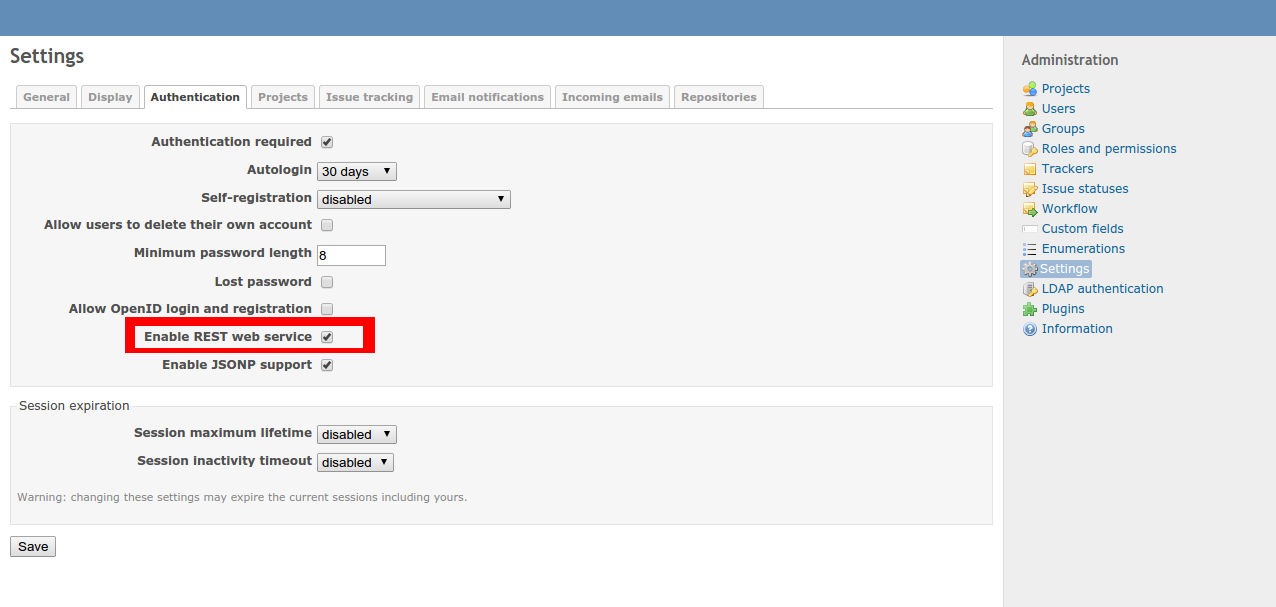
If you have so many WordPress sites to manage like me, you will find yourself getting into trouble when you have to look after every site's updates. plugins, themes... It would be great if we have only one place to manage all the sites. Fortunately, I found a pretty good solution, the InfiniteWP, and it's free. (This's not a rare situation anyway) InfiniteWP's official website: http://infinitewp.com/ Here are the only few things you have to do in order to setup a central place to control all your WordPress sites: 1. In every WordPress site, install the InfiniteWP client plugin: After you install the plugin, activate it to get the client details: 2. Install the InfiniteWP: a. Download the InfiniteWP source, unzip, and copy to /var/www/iwp Download link: http://infinitewp.com/installing-options/ $ unzip IWPAdminPanel_v2.4.3.zip $ sudo cp -R IWPAdminPanel_v2.4.3 /var/www/iwp $ sudo chown -R www-data:www-data /var/www/iwp b. Create a MariaDB ...
Trying WPScan, a black box WordPress vulnerability scanner
- Get link
- X
- Other Apps
I just found a great tool to scan my wordpress sites for vulnerability, WPScan . WPScan is a blackbox scanner which means that you can install it on your computer and scan remote wordpress servers. To install WPScan on my Ubuntu 14.04 server, I ran these command lines: $ sudo apt-get install libcurl4-gnutls-dev libxml2 libxml2-dev libxslt1-dev ruby-dev build-essential $ git clone https://github.com/wpscanteam/wpscan.git $ cd wpscan $ sudo gem install bundler && bundle install --without test Then, tried some of these features: 1. Simple check: $ ruby wpscan.rb --url www.mywordpress.com 2. Do a wordlist password brute force on all the users: $ ruby wpscan.rb --url www.mywordpress.com --wordlist darkc0de.txt Notes: you can download the sample wordlist file here . for more scanning methods, please read the WPScan's official website .
Some notes when working with Google Apps Script
- Get link
- X
- Other Apps
Here are some notes I took when working with Google Apps Script: 1. Global variables: Can't change global variables's values. If you want to change them, use scriptdb (removed on November 20, 2014), google spreadsheets (data < 10000 rows), or Google Cloud SQL (data > 10000 rows) instead. 2. Call external REST API(s) To debug your script when calling an external REST API using UrlFetchApp.fetch, you can use this parameter of the options: 'muteHttpExceptions': true, For example: var url = 'http://myapi.com'; var options = { 'method': 'POST', 'headers': headers, 'payload': 'This is the payload', 'contentType': 'application/json', 'muteHttpExceptions': true // use for debugging }; var response = UrlFetchApp.fetch(api_url, options); 3. For loops: For loops in Google Script looks a lot like python except for..., example: for(item in ...
SMS reminder in Redmine with Google Apps Script
- Get link
- X
- Other Apps
Do you remember how we use Google Apps Script to get SMS notification every time we receive an email? If not, please read this article . It's even cooler if you can take advantage of that script to remind you about Redmine 's issues due date. Even though Redmine already has the email reminder feature which is quite convenient but if you want more, like SMS, here is the hack: 1. Turn on the email reminder feature of Redmine by adding a crontab to run this rake task: # crontab -e 00 08 * * * /usr/bin/rake redmine:send_reminders days=7 users="12" RAILS_ENV="production" Everyday at 8AM, it will check Redmine, if there is any issue of mine will due in 7 days (not in closed status), it will email me. To turn the reminder on for all user, just get rid of the " users " parameter. More details at here . 2. In Gmail, create a filter for all email messages has the following word: Has the following words: " issue(s) due in the next ...
To use https (only) for Moodle with nginx
- Get link
- X
- Other Apps
To make your moodle instance work on https only is pretty simple with nginx: 1. Create a folder to contain the ssl certificate and key at /etc/nginx/ssl 2. Configure your nginx server block as following: 3. Create a simlink to the server block and restart nginx: $ sudo ln -s /etc/nginx/sites-available/mymoodlessl /etc/nginx/sites-enabled/mymoodlessl $ sudo service nginx restart 4. Add/modify these two lines to your moodle's config.php: $CFG->wwwroot = 'https://mymoodle.com'; $CFG->sslproxy=true; 4. Do not enable " Use https for logins " in Site administration / ► Security / ► HTTP security 5. Done
Openfiler permission problems with shares on MacOSX and Windows
- Get link
- X
- Other Apps
This morning, we encountered an incident with OpenFiler server. It is this: We have Mac users and Windows users (and some genius Linux users :D) but they are belonged to a same group name ABCD. We granted write permission for all users in the ABCD group. When a Mac user sharing a folder on the OpenFiler server, other users of the ABCD group suppose to have all permission on that folder, but nope, they cannot do anything except read. I investigated the folder with getfacl command: # getfacl /mac_users/shared_folder ... group::r-x ... As you can see, the group attribute lacks of write permission. I was googling around and found this article: http://www.maykinmedia.nl/blog/2009/aug/22/openfiler-permission-problems-share-macosx-windows/ That guy had exactly the same problem with us, and he gave a solution: Enable inherit_owner option of samba to avoid this issue in the future with new folders For the old folder, after you have enabled inherit_owner of samba, y...
Google Apps Script - Using Google Script to create issues in Redmine via REST API
- Get link
- X
- Other Apps
Google Apps Script - Send SMS when receiving an email in GMail
- Get link
- X
- Other Apps
So, you don't have Internet access but still want to be notified whenever someone special email you (GMail)? Here you go: Google Apps Script FTW. 1. In GMail, create a label name "Send SMS", then create a filter to apply that label to whichever messages you want. For example, every message coming from the email address my-love-one@gmail.com will be applied the "Send SMS" label. 2. Go to Google Apps Script , create a blank project, paste this script into the script editor: Every time the Gms_send_sms runs, it will get all email messages which have "Send SMS" label. Create an event in the Google Calendar for each message. Create an SMS notification for each of those events. Remove the label of those messages 3. In the script editor, select Resources menu >> Current project's triggers >> create a trigger to run the Gms_send_sms function every 5 minutes. You will need to grant permissions for the script to access your gmail...
Using python-redmine to communicate with Redmine via Rest API
- Get link
- X
- Other Apps
I'm using Redmine , the opensourced Project Management system, as a support ticket system. The way it's working right now is: whenever someone needs help, she will send an email to helpme@mycompany.com. Then there is a ruby task (rake) runs every minute to pull emails from that address (via IMAP ) and create a ticket (issue) in the helpdesk project in my Redmine server. But the thing is the Redmine's rake task can not create issue with category (Department A, Department B,...) based on the issue's content. We can only specify the fixed category beforehand in the rake command: rake redmine:email:receive_imap RAILS_ENV="production" \\ host=imap.foo.bar username=redmine@somenet.foo password=xxx ssl=1 \\ project=foo \\ tracker=bug \\ allow_override=tracker,priority \\ category='Department A' So, I looked around and found that Redmine has REST API . It's even greater with python-redmine, a python library to help me ...
Google Apps Script - Part 3 - Send email with form after submitting google form (advanced)
- Get link
- X
- Other Apps
So, you now know how to send people email after submitting a google form ? How about including in that email a form required that person to answer some questions? And the data that she submit will be inserted back into the response spreadsheet of the original form. Yeah, another form, sounds like inception huh :D Here is a hack: 1. In the email template, include the form: <h2>Please respond to the reflection question(s) posed to you in the Teacher Feedback form</h2> <form action="http://localhost:8081/myform" method="POST"> <input type="hidden" name="rownumber" value="{{rownumber}}"> <div> <textarea name="q" style="width:90%;height:100px;"></textarea> </div> <div> <button type="submit">Submit</button> </div> </form> The form will look something like this in the email: N...
Google Apps Script - Part 2 - Send email result to selected address after submitting google form (advanced, email with template)
- Get link
- X
- Other Apps
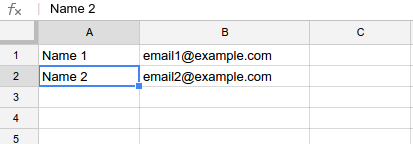
This blog post is an advanced topic of the previous article about sending email result to the selected address after submitting a google form. The advanced features are: The email address will be get from a separate sheet instead of choosing from the form. The email content will be get from a template which is also from a sheet instead of hard-coding into the script. 1. In the same spreadsheet of the responses sheet, create a new sheet name "emailaddresses". Fill in the name of a person in one column (A) and email address of that person in another column (B): Note: The names in column A need to be exactly the same with the names lists in the form. Check out the getEmailByName function in the script below for more detail. 2. In the same spreadsheet of the responses sheet, create a new sheet name "emailtemplate": * Create your email template in html form with placeholder where you will fill in the submitting result, for example: * Minify the template ...
Google Apps Script - Part 1 - Send email result to selected address after submitting google form (basic)
- Get link
- X
- Other Apps
So, you want to email someone (something like a feedback to that person) whenever you submitting the google form. Here you go, using this google apps script: 1. First, make sure you have already setup the responses spreadsheet and name it , for example: "sheet1" . Look for the spreadsheet ID in the URL. It's something like: '11BvY139qDAc06KxJrSUowCRwPNKVgNgSsPtmjQGhOPQ' 2. Insert a blank column at the end of the responses spreadsheet , e.g column AH ( 34 ). Enter this formula in the first row: = indirect ( "AG" & counta ( A1:A ) ) "AG" is the column contains email addresses. 3. From the google form edit windows, choose Tools >> Script editor... to open script editor window and input this function : 4. In the Script Editor windows, select Resources >> Current Project's Triggers >> Add a new trigger 5. Go to the live form, and try to submit. Cool!!! \m/
How to avoid "Models aren't loaded yet." error in Django 1.7
- Get link
- X
- Other Apps
Today, I's trying to run a python script to manipulate my Django app's models and got this error: django.core.exceptions.AppRegistryNotReady: Models aren't loaded yet. The script used to work before I upgraded my Django project to version 1.7. I then go back to the Django1.7 documentations I found this instruction: https://docs.djangoproject.com/en/dev/releases/1.7/#standalone-scripts Standalone scripts If you’re using Django in a plain Python script — rather than a management command — and you rely on the DJANGO_SETTINGS_MODULE environment variable, you must now explicitly initialize Django at the beginning of your script with: >>> import django >>> django . setup () Otherwise, you will hit an AppRegistryNotReady exception. So, I modified my script as following: #! /usr/bin/env python def setup_environment(): pathname = os.path.dirname(sys.argv[0]) sys.path.append(os.path.abspath(pathname)) sys.path.append(os.path.norm...
Install moodle 2.8 with nginx and php5-fpm in Ubuntu14.04
- Get link
- X
- Other Apps
The latest version of Moodle (v2.8) had been released a couple days ago with some improvement especially the gradebook ( click here for more information). This blog post is about deploying a moodle instance along side with nginx and php5-fpm . 0. Create the database: $ mysql -u root p MariaDB [(none)]> create database moodle; MariaDB [(none)]> grant all privileges on moodledb.* to 'moodleuser'@'localhost' identified by 'moodlepassword'; 1. Clone the latest stable Moodle using git: $ cd /var/www $ sudo git clone --depth=1 -b MOODLE_28_STABLE --single-branch git://git.moodle.org/moodle.git $ sudo chown www-data:www-data -R moodle $ sudo chmod -R 0777 moodle 2. Create the moodle data directory: $ sudo mkdir /var/www/moodledata $ sudo chown www-data:www-data -R /var/www/moodledata $ sudo chmod -R 0777 /var/www/moodledata 3. Setup nginx: $ sudo service nginx restart 4. Config php5-fpm: make sure the /etc/php5/fpm/php.ini: ... ...
Active Directory authentication in Django
- Get link
- X
- Other Apps
In this article I showed you how to authenticate users of your Django apps against a LDAP server. It's quite easy with open-sourced software huh?! But, if your current infrastructure is built on a proprietary software like MS Active Directory, you will need an extra effort to plug in your Django projects. I will show you how. Read on! Here are the important settings for django-auth-ldap module you need to set: * USER SEARCH : AUTH_LDAP_USER_SEARCH = LDAPSearch("OU=All Users,DC=MYAD,DC=COM", ldap.SCOPE_SUBTREE, ' (SAMAccountName=%(user)s)' ) * GROUP SEARCH : # Set up the basic group parameters. AUTH_LDAP_GROUP_SEARCH = LDAPSearch("OU=User Groups,OU=All Users,DC=MYAD,DC=COM", \ ldap.SCOPE_SUBTREE, "(objectClass=organizationalUnit)") , #!important! set group type AUTH_LDAP_GROUP_TYPE = NestedActiveDirectoryGroupType() * USER FLAGS : AUTH_LDAP_USER_FLAGS_BY_GROUP = { "is_active": ["CN=...
Error when upgrading Wordpress from 3.4.2 to 4.0
- Get link
- X
- Other Apps
Just a couple minutes ago I's trying to upgrade our "ancient" wordpress blog which is still running on a Ubuntu 10.04 server from version 3.4.2 to the latest version, 4.0. It wasn't that easy. This error showed up after I press the "Upgrade" button: The package could not be installed.: PCLZIP_ERR_BAD_FORMAT (-10)... What's up man? Okey, I did these following to fix that: 1. Make sure the wordpress directory has the correct owner: $ sudo chown -R www-data:www-data /var/www/wordpress 2. Then temporary change permission of the wordpress folder like following: $ sudo chmod 0755 -R /var/www/wordpress $ sudo chmod g+s -R /var/www/wordpress Then I ran the upgrade again. It worked like a charm!!! \m/\m/\m/ Note: remember to change the permissions back after you finish the upgrade (or you can use a security plugin to do it for you)
How to show the correct object numbers (counter) when using django-pagination
- Get link
- X
- Other Apps
I'm using this template tag to output the order numbers of an object list in a for loop: {% for myobj in myobjlist %} {{ forloop.counter }} ... {% endfor %} But if I use pagination, the number will always start from 1 in a new page. Here is the trick to show the correct number: add to the counter (use zero index instead, counter0) the object index: {{ forloop.counter0|add:myobjlist.start_index }} Neat!
How to disable mouse scroll wheel zoom on embedded Google Maps?
- Get link
- X
- Other Apps
To disable mouse scroll wheel zoom on embedded Google Maps, you just need to set the css property pointer-events of the iframe to none : <style> #mapcontainer iframe { pointer-events:none; } </style> <div id="mapcontainer"> <iframe src="https://www.google.com/maps/embed?pb=!1m18!1m12!1m3!1d49558.05949043515!2d-94.820775!3d39.075070499999995!2m3!1f0!2f0!3f0!3m2!1i1024!2i768!4f13.1!3m3!1m2!1s0x87c08e065e054485%3A0xf8652fbc74a54de0!2sEdwardsville%2C+KS%2C+USA!5e0!3m2!1sen!2s!4v1415172721068" width="600" height="450" frameborder="0" style="border:0"></iframe> </div> Further more, you can use this jQuery snippet to toggle the pointer on/off: <script> jQuery('#mapcontainer').toggle(function () { jQuery('#mapcontainer iframe').css("pointer-events", "auto"); }, function(){ ...
Make html tables fixed size with css
- Get link
- X
- Other Apps
My Djangp app output data like this in the template: {% for mydata in mydataset %} <table class="mytable"> <tr> <th style="width=50%;">Column 1</th> <th style="width=50%;">Column 2</th> </tr> {% for data in mydata %} <tr> <td>{{ data.attr1 }}</td> <td>{{ data.attr2 }}</td> </tr> {% endfor %} </table> {% endfor %} The thing is I want to make all my html tables keep a certain size even when the content inside the cells may vary. Here is the trick I'm using: table.mytable { table - layout : fixed ; }
Trying the Taiga project management platform
- Get link
- X
- Other Apps
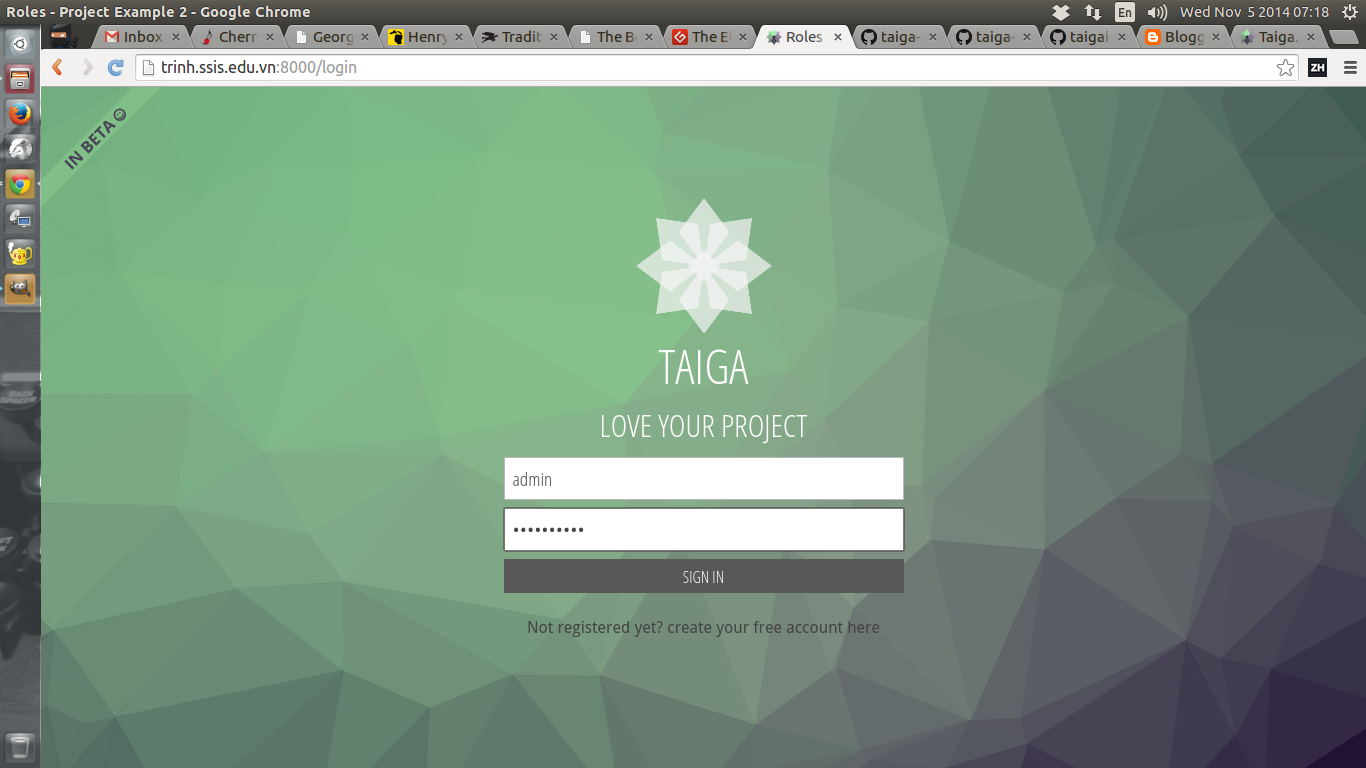
If you love Agile and looking for a tool to integrate that method into your org, you should try Taiga: https://taiga.io/ Taiga is an open-sourced project management platform based on Django and AngularJS which are both also open-sourced. It's really easy to get started with Taiga using vagrant thanks to the team: https://github.com/taigaio/taiga-vagrant All you have to do are (you need to have VirtualBox and Vagrant installed on your machine first): $ git clone https://github.com/taigaio/taiga-vagrant.git $ cd taiga-vagrant $ vagrant up After the provisioning is finished, you can access the platform by opening your browser, enter this address: http://localhost:8000 The default admin user is admin / 123123 If the vagrant provisioning does not process successfully, you can have a look at the script: https://github.com/taigaio/taiga-vagrant/blob/master/scripts/provision.sh The provision script will clone this taigao-scripts repo and run the setup-server.sh: ...
Running cherrymusic as a service in Ubuntu 14.04 with Supervisord
- Get link
- X
- Other Apps
In the previous blog post, I showed you how to run a music streaming service on your computer: http://iambusychangingtheworld.blogspot.com/2014/10/build-your-own-music-streaming-website.html Today, I will guide you how to setup cherrymusic as a service using Supervisord . I love Supervisord! I got some trouble getting cherrymusic to work with Supervisord: * I first tried running cherrymusic with Python2: when clicking to the "browse files" link, it said that cannot browse files and throw this error in the backend: UnicodeDecodeError: 'ascii' codec can't decode byte 0xec in position 1: ordinal not in range(128) * Then, I switched to Python3 and also got errors, but this time, it is a fixable issue: cherrymusic can list my albums but when I clicked to one of the album, it through this error: ... UnicodeEncodeError: 'utf-8' codec can't encode character '\udcc3' in position 7: surrogates not allowed this is a Python3's bug: h...